ZBrushCentral

Custom UI button getting replaced

So I have a custom menu that uses the polish button from both Shadow Box and Dynamesh in it. Everytime I restart Zbrush it replaces my dynamesh polish with my shadow box polish button. I am assuming this is because they have the same path name.

Is there a way for me to fix this?
Do I have to rebuild my menu using sub-menus?
Is there a way to move a sub-menu? Everytime I try to move the sub-menu it will only rename the menu, it doesn’t allow me to move it once anything is in the menu. Do I need to build out all of my menus first? Do I have to rebuild the entire submenu again if I make a placement mistake?

Basically…ahhhhhh!!!

Any help is appreciated.
Thanks,

Attachments
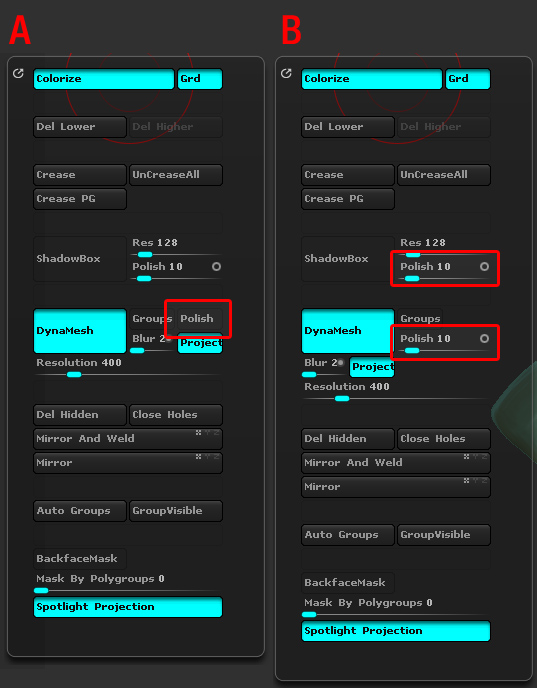
customMenu.jpg

That issue has come up before and the development team have been told. There’s no perfect solution but the attached little plugin may help. Unzip and put the included ZSC file in your ZStartup/ZPlugs folder. After restarting ZBrush you will have a new Polish switch in the Zplugin>Misc Utilities sub-palette. You can use this in your UI.

The drawback: the plugin switch will not update with the Dynamesh switch, so you’ll need to press it at least once to be sure it has set the option you want.

Thanks Marcus. I’ll take a look and see if that will work out for me. I suppose I can always ditch the shadow box one for now if I needed to as it is used less frequently.

Thanks again,

I’m afraid that ditching the shadow box one won’t work. The Dynamesh polish will always be replaced by that in a Custom UI.