ZBrushCentral

cursor projection on subtools...

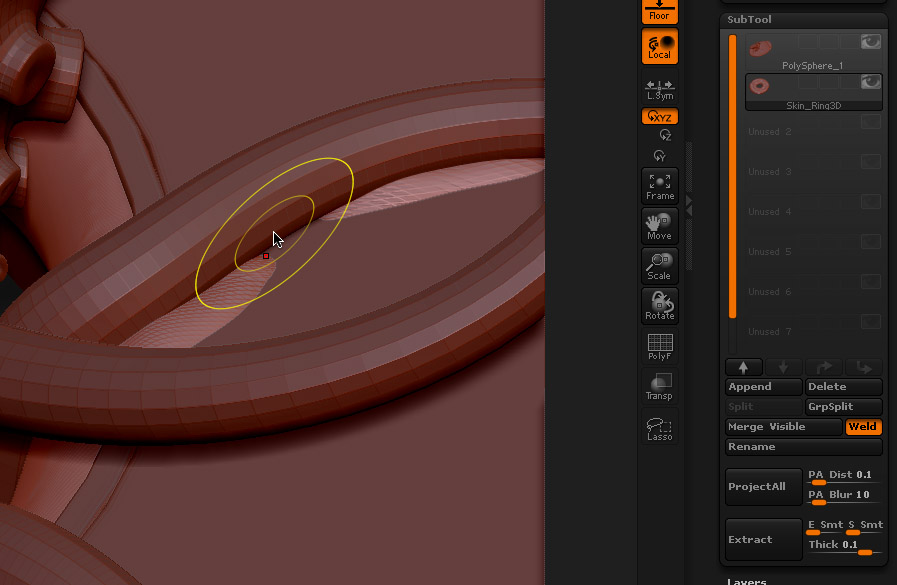
As you can see, I’m working on a subtool (the lower one) but my cursor is projected on the first one (non active). This will give errors in the mesh because of the strange angle of the cursor to the active mesh.
Can I switch this behaviour off, so that the cursor only projects to the active subtool and disregards all other non active subtools?

Attachments
ZBrushOSXSchermSnapz004.jpg

Hmmm … i would say switching to “Once Z” instead of “Continous Z” in the picker palette should solve that issue … hopefully :slight_smile:

Thanks for the quick reply, dsoellbuster.
That and the once/continuous orientation did help a bit. Together with switching the first subtool on and off gives a (kind of) workable situation.

:+1:

Switch on Transparency (button towards the bottom on the right of the UI). You may find switching on Ghost also makes sculpting easier.

Cool idea marcus … :smiley: never thought of that …

He Marcus! Thanks man!! :+1: :+1: :+1:
That was exactly what I was looking for! Thanks a bunch!!