ZBrushCentral

Creating Mechanican Models in ZB

Hello all ,

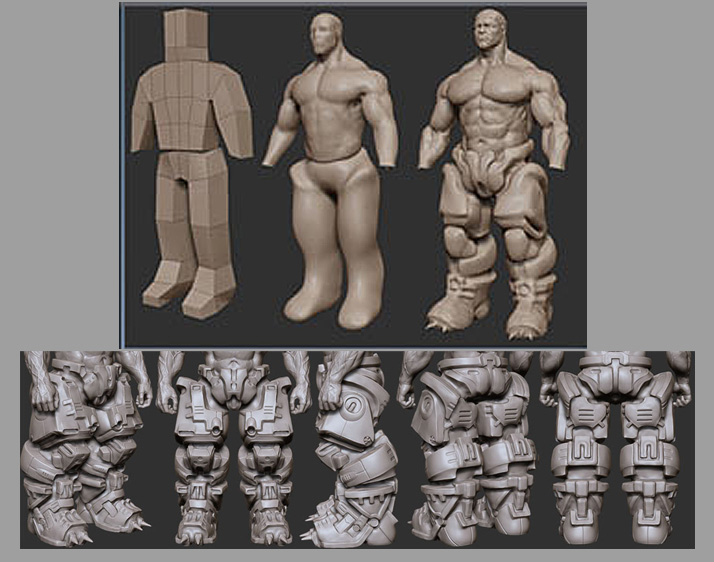
I’m wondering how the artist (Faraz Mobin) did the mechanican parts of the character this well , but not exactly how and about this character only , its a big question for me how can I sculpt such a things?

Is there a special method? maybe a brush that I didnt use before or any thing that I should know?

What do you think? whats the best way? any tutorial?

So many question but I thing people can learn from your answers a lot :slight_smile:

Thanks for reading , if you know a good way , please share :slight_smile:

Attachments

ques.jpg

There are some ideas on my blog to get you started.
http://www.lovecraftforest.com/blog/?s=zbrush+mechanical

A lot of what I’m seeing in Franz’s work can be accomplished with straight forward sculpting technique to represent hard surfaces, which involves using tools that give you rigid edges. Tools like masking, square-based alphas, and the layer and flatten brushes will play the part, as well as very pointed tools like the Maddam’s standard brush (see this thread: http://www.zbrushcentral.com/zbc/showthread.php?p=447512)

Study up on creating and manipulating stencils and masking, as these will help you create “controlled edges” when you press into or build up on ZB’s virtual clay.

-K

Thanks , those are very helpful :slight_smile:

I took a deep at the mech legs , and I can see using Layer brush + masking to bring out the parts , also using masking and standard brush then pinch brush for those parts , I think I can do it with practicing :slight_smile:

[A round of applause]

I really wanted to know this too - Can`t sculpt to get those slick non-organic feel.

I think it needs a lot of time and accurate work on edges , playing with tools and their intensity, I did not tried yet , but as soon as I get some free time , I’ll try to create a small part of that mech leg and send here .

I haven’t done a tut on this yet for my blog, but projection master is another trick in the arsenal for layering things. I tend to not use it as much because I actually like the effects I get by wrapping alphas, masks and stencils to parts and then just free-handing with a correctly set layer brush to pull out parts or push them in.

Also, don’t ignore what turning on radial symmetry can do having dozens of little brush heads laying some pattern in a circular fashion can give neat effects.

If you haven’t experimented with the “lazy-mouse” settings, you should look into that for detailing. Look at how the various “stitch” brushes are set up and you’ll see how you can drag a repeating alpha over the virtual clay much like a textured wheel rolling over the surface.
-K

Thanks for new information , I’ll check them asap :slight_smile:

if will be cool if any body send a sample here and tell us about its process :slight_smile:

just found this thread

actually i just use normal brushes and clay brushes to pull out deep shapes from a box or a sphere.then i start some detailing.but beware this process does take time.

the main brush i use is pinch. now use pinch with alt press and it gives you a diff result…almost like inset and inside bevel so lets say if you want an outer edge to be sharp you use pinch without alt but wat if you want an inner edge to be sharp you use alt+pinch

[tip1.jpg](javascript:zb_insimg(‘143549’,‘tip1.jpg’,1,0))

in the end i use flatten brush for some final touches,but this is only for the proxy mesh.so thin that model the final leg was created in max using some surface modeling tool and creat mesh on top of the zbrush mesh.

i usually stay away form projections and alphas cos i dont want alot of surface mech details.wat i wanted for that piece was big chunks on metal placed well over eachother casting shadows.

hope this has been helpfull

Thank you very much , I really love your method . but I dont know why you use max to remodel the proxy mesh? I think its possible with retopology too? or maybe in max we will have more and more sharp and accurate edges .

Thanks again.