ZBrushCentral

creating displacement that overlaps...

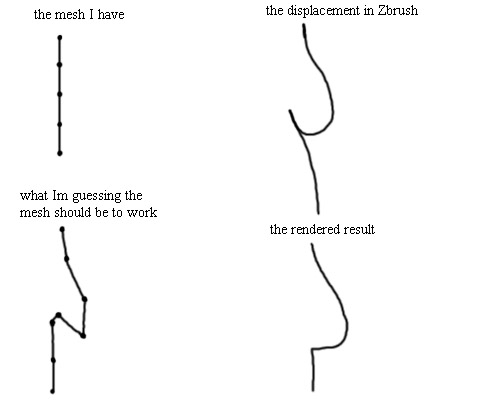
I need to paint some creases onto a characters clothing, and I would like to paint some creases that fold over and not just a series that go up and down.

Though, when I do paint some creases that overlap I dont get the result I want when I render (Renderman) (besuase the displacement is only going in or out).

I guess the way around this would be to export a new mexh from Zbrush that has added bits of geometry, so this folding, or overlapping can still be created with a black and white displacement map. The problem with this is that I cannot change the model, so my question is can this be done with maps?

I have an image as an example and I hope I have made sense…

Attachments
disp_overlap.jpg

I’ve heard that Renderman can displace curved geometry, which would be similar to what you’re trying to do. However, I don’t know if a displacement map would be all you need to do that. I think that RGB maps, like normal maps for instance, would have the information necessary to displace geometry following their normals in space. I have zero idea if that’s how it actually works though, it’s just something that I have imagined would work if that’s how Renderman renders.

The displacement maps created by ZBrush are normal-based displacement, which means that the mesh can only be displaced along the surface normal. Overhangs are not possible.

I believe that chadtheartist is correct about RGB displacement maps, but such a map cannot be created by ZBrush at this time. Unless maybe it’s possible to use a normal map in this capacity? The drawback that I can see there, however, is that the nromal map will be 8 bits, rather than the 16 that are necessary for the best displacements.

But, isnt that what a normal map does? It has 3 colours that represent xyz then the renderer picks up on this?

That’s why I suggested that you MIGHT be able to use a normal map for displacements with one of the rendering engines that processes RGB displacement maps. I don’t have enough information on this subject, however, to be able to answer with certainty.

Now if your question was regarding my statement about 8 bit vs. 16 bit, there’s something very important to keep in mind. There is a huge difference between what a normal mapped render does and a displacement mapped render. You see, a normal map is rendered essentially as a sophisticated bump map. It gives awesome results within the silhouette of your mesh, but doesn’t actually change the profile. A displacement map, however, DOES change the profile of the mesh. It’s doing something very different from just tweaking surface normals; it’s actually moving points or pixels. Doing this accurately requires more bit-width than normal mapping does. That’s why some people have posted images on here of displacement renders that had bad banding (or stair-stepping) going on – they had inadvertently converted th 16 bit alpha that ZBrush outputs into an 8 bit texture, or their rendering engine just didn’t support 16 bit maps and rendered it as 8 bits. That’s why I said that even if a normal map could be used for displacements, the results might not be perfect due to the lower bit-width of the image.