Hello,
at first: I’m a beginner. I read a lot and watched hours of Video tutorials but there are still questions. 
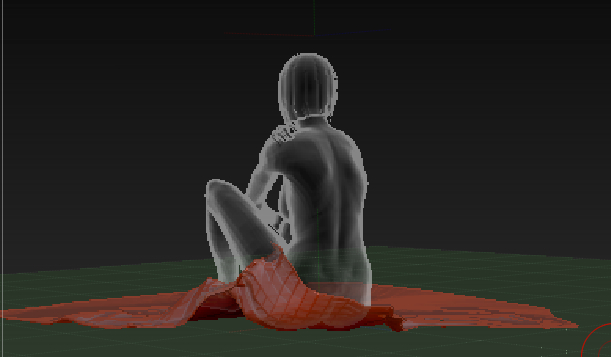
I have a female figure sitting on a floor. I want to put a silk cloth on the floor. That cloth shall be partially wrapped around her hips and shall lay on the floor otherwise. But I’m running into a couple of problems and would like to get some advice.
-
I used a ThickPlane as a primitive as starting point. To arrange to plane even on the floor I used the Deformation tool. Is there a better way? It took quite a time to get it right.
-
Is there a way to create an object in a predefined size? The cloth shall be a square of 3m x 3m. I used the Transpose-Tool / action line to measure the size after I have drawn the initial primitive. Correct way?
-
I used the fold brush to add some folds. Seem to work fine. But while doing a test render I had to learn that I pushed the folds below the ground level. In result some parts of the cloth were not visible after rendering. Can I tell ZBrush that I want not to push a polygon below a certain level?
-
Similar question: If I wrap the cloth around the woman’s hip can I tell ZBrush to respect the skin of the model? While wrapping I pushed the cloth quite often into the body of the woman and had to pull it out again.
Kind Regards
Attachments