ZBrushCentral

Controling Brush Depth? ignore backfacing

hey all,

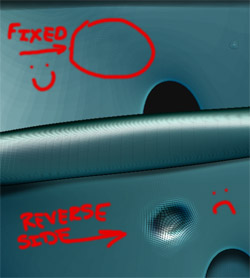
I’m trying to use the flatten brush with a Z intensity of 2 to flatten out some poles in my mesh. I’m working on a thin model, it’s one of the many membranes in the body (I’ve done a lot of them…) but this one needed a hole in it so there are poles from the creation of the hole. usually smoothing poles isn’t a problem for me but the brush is affecting the backside of the model. is the any way to tell ZBrush not to affect backfacing polys?
[ZbrushPoleBrushDepth.jpg]ZbrushPoleBrushDepth01.jpg
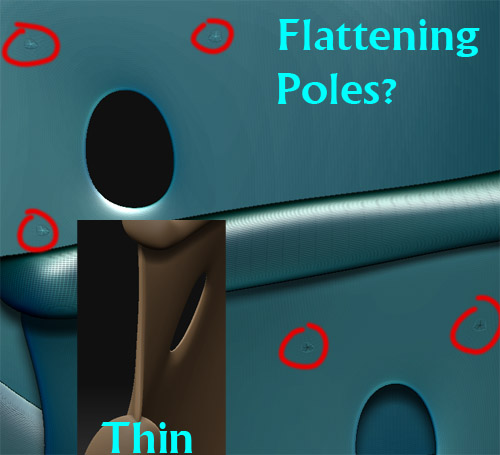
brush>backfacemasking…near the bottom

in 3.1 you can’t use a Zsub when doing it though…but for poles and the flatten brush you should be fine.

It worked just like i thought it should… thanks alot for the info… am i correct in assuming that its a ‘per brush’ type of setting? meaning i can save this flatten brush with the ignore backfacing as my “pole squasher” brush?

I believe so…but not sure.
also, you can do a Zsub, Marcus D just said in another forum. you just have to set it to -100…just an FYI

Thanks for the info! im still not sure if it’s a brush by brush setting… it was turned on for my move brush as well, which of course had me cursing the software… then i remembered i turned on ignore backface… But, problem solved! thanks again!

Backface masking is a per brush setting and can be saved with a custom brush. However, there’s an issue in 3.1 where settings can be inadvertently transferred between brushes and that may be what happened with the move brush. Use the Reset Brush plugin to restore brushes.