Hello folks,
I’m new to sculpting and after a few clumsy sculpts I’m begining to understand how basic functions of Zbrush work (I’m in love with Zbrush btw).
But I keep facing a problem what is due to my clumsiness and ignorance, and as I am in the “valley of the Suck” to quote Ryan Kingslien, I have decided to fight and solve all problems so as to progress!
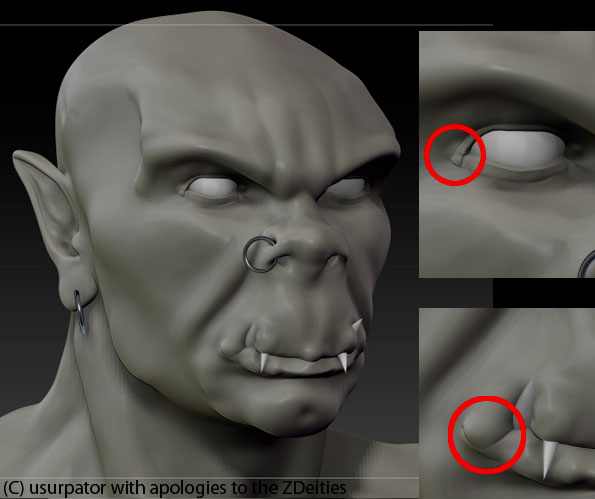
Here is an ork I quickly through together. I has two problems (corner of eye, corner of lip) that I keep getting on all my beasties.
I tried these:
1/ giving up on the sculpt and starting again , but I don’t learn anything that way
2/ softening, try all brushes known to Man, pushing pulling from outside and inside but all I get is a mess even after command-Zs gallore
3/ I also considered using only dynamesh from now on but… something tells me I must learn the “old fashioned” way.
I’m at my wits’ end, I’m a painter not a sculptor, and one very rarely gets folds and creases in photoshop or on canvas:)
I’m sorry to bother you with this but I’m facing a stublimg block. All advise will be most welcome, also I’d like to know how to avoid getting into such a mess.
Many thanks to all for sharing your work, I learn a lot just hanging around here!
Cheers
Usurpator
ps:please forgive my terrible English
Attachments