ZBrushCentral

Complete Newbie Question... :)

Hey yall. I have worked in mudbox the past two years and had a question when you work with a tool and its display.

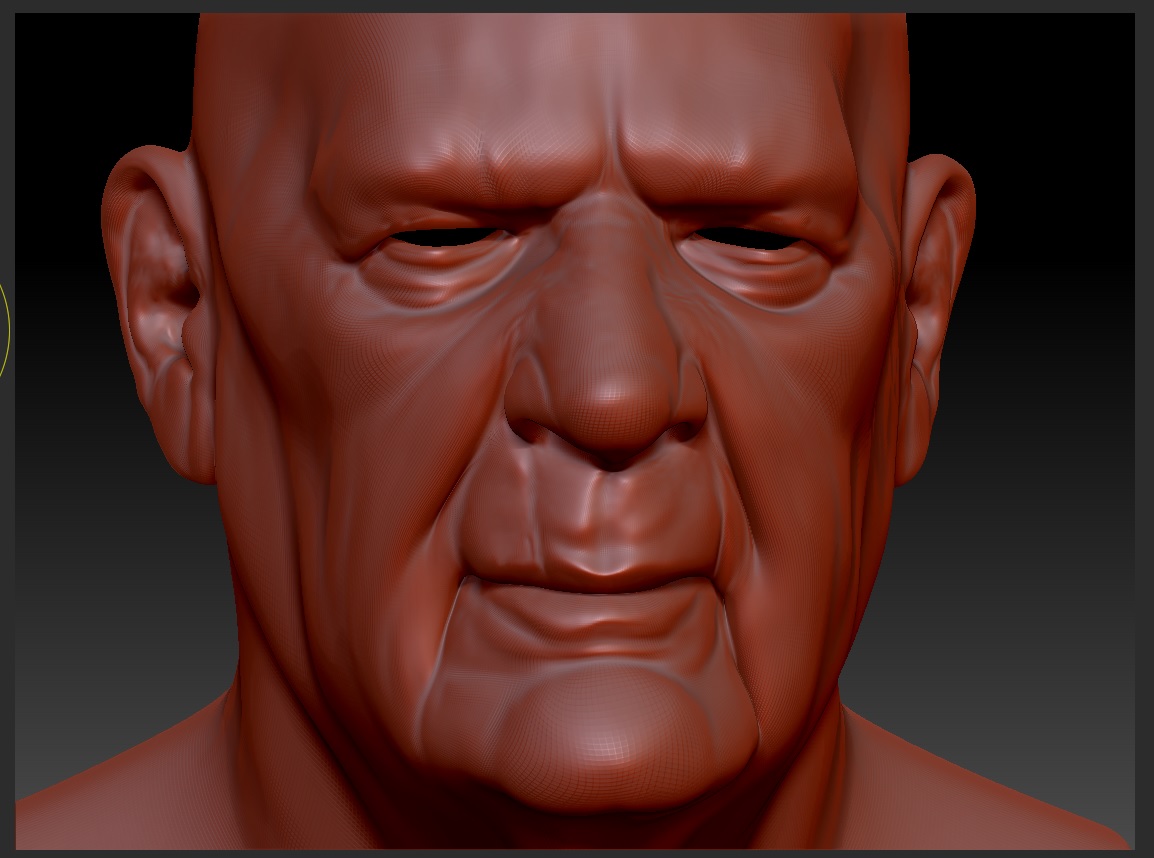
I imported my own obj, and while it imported extremely quick, I am wondering why my model (material is the matcap red wax material) has weird grey spots and you can see the uvs of the mesh. I have divided my mesh several times (5) and you can still see them. I have posted a screen shot. The option to show uvs is obviously not on.

Is this performance regular, or a setting/configuration that I need to look into to resolve this? I have a Quadro 4000 so it may be a display issue.

Notice the weird grey spots? Also the divided uvs in the nose and chin area?

Attachments
test.jpg

I am assuming by UVs you mean the faceted model.

The gray areas you’re talking about (I am assuming, as you didn’t actually point to them) are the gray shaded areas on your mesh.

That said, your subD level is relative, so your mesh might actually be as dense as it is being displaced. In example. A box with 6 polygons sub divided 5 times is only ~6k polygons, while a head that starts at ~10k polygson with 5 subD levels is ~1 million polygons.

So, is your mesh a full character?

Does your mesh look better using a different material, like matcap gray or the basic material?

Zbrush doesn’t use any smoothing to display the mesh unless you tell it to during render time, so all meshes are faceted unless they are subdivided so dense that they don’t display any faceting.

Yes. I am referring to the gray shaded areas.

The mesh is just a head right now. No body.

The mesh looks better using the matcapgrey, mainly because I do not see hard lines outlining the faceting.

This mesh is currently 6000 polys with no subdivisions. I have posted screenshots.

matcapredwax.jpgmatcapgray.jpg

My confusion is I dont understand the grey shaded areas on the red matcap default, as well as the harsh lines that border the faceting throught the mesh. This could just be how the material reacts, I just want to make sure everything is working properly.

http://www.zbrushcentral.com/showthread.php?183623-lights-materials-and-rendering&p=1066841&viewfull=1#post1066841

The gray areas are part of the material. Personally, I hate the redwax material. I find it hard on the eyes, pretty much anything but that material and I am happy. It is nice for finding imperfections in your mesh if needed though.