I did a quick search in the forums, but couldn’t find any topics on this, and I’m wondering if it happens due to a custom layout or other modification to preferences I may have made:
When using ‘C’ hotkey to select a color onscreen, the saturation/value cursur in the main color sqaure will update its location in the main color square, but the HUE cursor does not change position (regardless which color ‘modifier’ is being used’). The means that picking a color on a model, then trying to adjust its value/saturation is impossible because it will snap back to the previous color. Anyone else experiencing this?
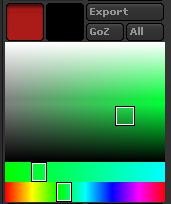
Here is a screenshot/repro: (the primary color chip is on the left since I have a custom layout)
- I first select a green color
- Then using the ‘C’ hotkey, I select a red
- The primary color chip changed to red, but the color palette is still green (although the value saturation cursor did move in the main color square)
- If I then try to adjust the color’s attributes in the palette (hue,value, saturation, etc), it pops back to green
Attachments