ZBrushCentral

Close Holes kills polypaint

Win7x64 Zbrush 4R6 P2

Well, i know i can reproyect back from a duplicated subtool. But some times proyecting requires a lot of time and it´s not allways perfect. It usually needs tweaks in the proyection on each level etc. But why when dynamesh closes holes preserves the polypainting nicely but just the close holes button destroys completely the polypaint?

Attachments
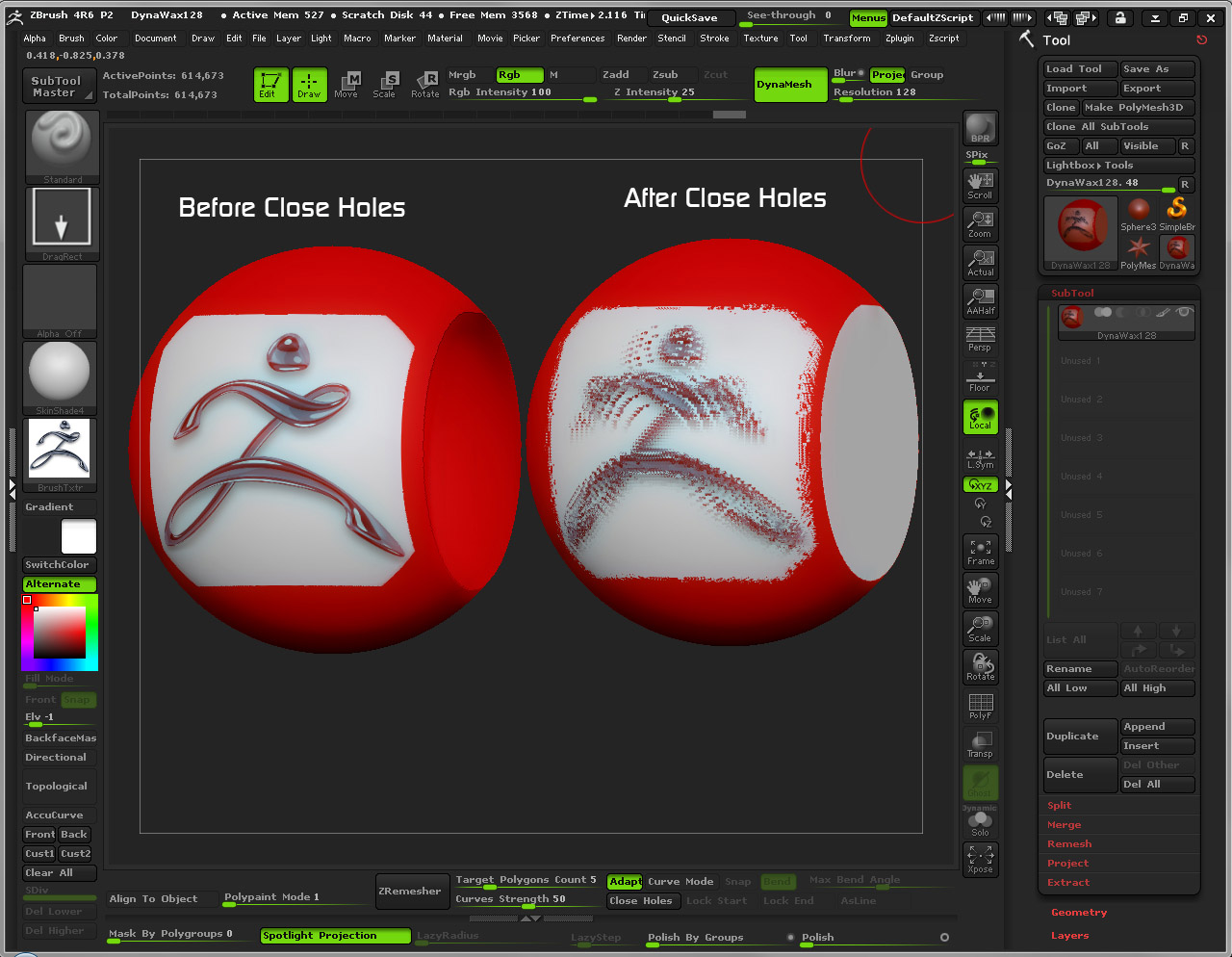
CloseHolesError.jpg

i test it. but it seem that i don’t have such problem…
ZBrush ScreenGrab01.jpgZBrush ScreenGrab02.jpg

Thanks a lot for testing in your system namdoyle :+1:
But this is totally wired then. Why it works fine for you and not for me? I have a recently clean reinstalled and updated version…:confused:

hi, my system spec is something like this:

window 7 32 bit
2GB DDR2 RAM
AMD 5200+ CPU
GTS 450 display card.

:confused:

i´m running on Win7 x64
12Gb Ram (Only 4 used by Zbrush…)
i7 950 3.5ghz
GTX 570 (Not used by Zbrush at all)

I ran the test as well. It works for me as well.

I blame skype.

Thanks a lot beta_channel for you help.

Well i tryed quitting skype, dropbox, GDrive and Skydrive… But the bug is still there. It seems my Zbrush has an impresionist personality or something… I´m recording a video with the glitch.

You have a Dynamesh, I don’t think the others do. Not sure if having RGB on will cause blur or not.

Thanks Doug

Tested, but in this case RGB is not causing the glitch.

Here is the Glitch driving me crazy :rolleyes:
https://www.youtube.com/watch?v=dfKltg1Mcp0&hd=1

PS:Is this part of the forum restricted to upload files and imbed youtube videos?

Why did you turn on Double Sided before closing hole?

Just turned on for the show. But it happens with it active or disabled
Thank you very much for your suggestions, i´m now testing new things and i think i´m close to figure where is the problem. Just need to confirm but i have it working fine in some sessions

Thanks all for your time trying to solve this

I recorded a session where you can see the glitch happening lot of times with different results. Some times just works fine. But in most cases it fails for me

http://www.youtube.com/watch?v=BJaTkQo0jog&hd=1

PS: Sorry for the horrible quality of the video and for the crazy tests i did…

so. after watching your vids I think I found the error.

If you use slice curve with polygroup turned on to slice the mesh, then hide it and delete it. Close holes will work.
If you just hide the geo, it will break.

not sure about a work around for this, but at least it is starting to find the actual error.

edit:
after some tests…only about 50% of the time will slice curve not destroy the polypaint.

Thanks for your help Beta_channel

I didn´t use slice in any way in the video. All hide polys and delete hidden. Just in some moments i use my hotkey for delete Hidden. Actually i thought this was the problem. But after testing like a fool i found it is not stable for me.

After seen my own video some times i noticed the only proyect that never gets glitched is the DynaWax128. Probably the DefaultCube too. But rest of default projects does… It has no sense for me, but hope it has for someone…

Is it causing this polypaint issue in your system too?

Yep. I get the same error.

Thanks for confirm that beta_channel

im using a eyelash custom brush but when i use it it seems to turn the background black and i cant move on to the next part of the eye i want to add eye lashes to PLEASE HELP ME how do i select add and move on to the next selection!?

Hi elfTITS.

We are using this thread to talk about a Closing Holes problems. If have any question about other topics i suggest you to create a new one. If it is related to any IMM brush here you can post it
http://www.zbrushcentral.com/showthread.php?170779-Questions-and-Answers-for-the-Insert-Multi-Mesh-Repository

Regards

Hmm. I haven’t seen a thread ninja in a while…kids these days.