ZBrushCentral

Clear demonstration of the bug of displacement in z 3.5 r3

HI all!

I spend the day to try to export a decent displacement map from the 3.5 r3…
Nothing to do!

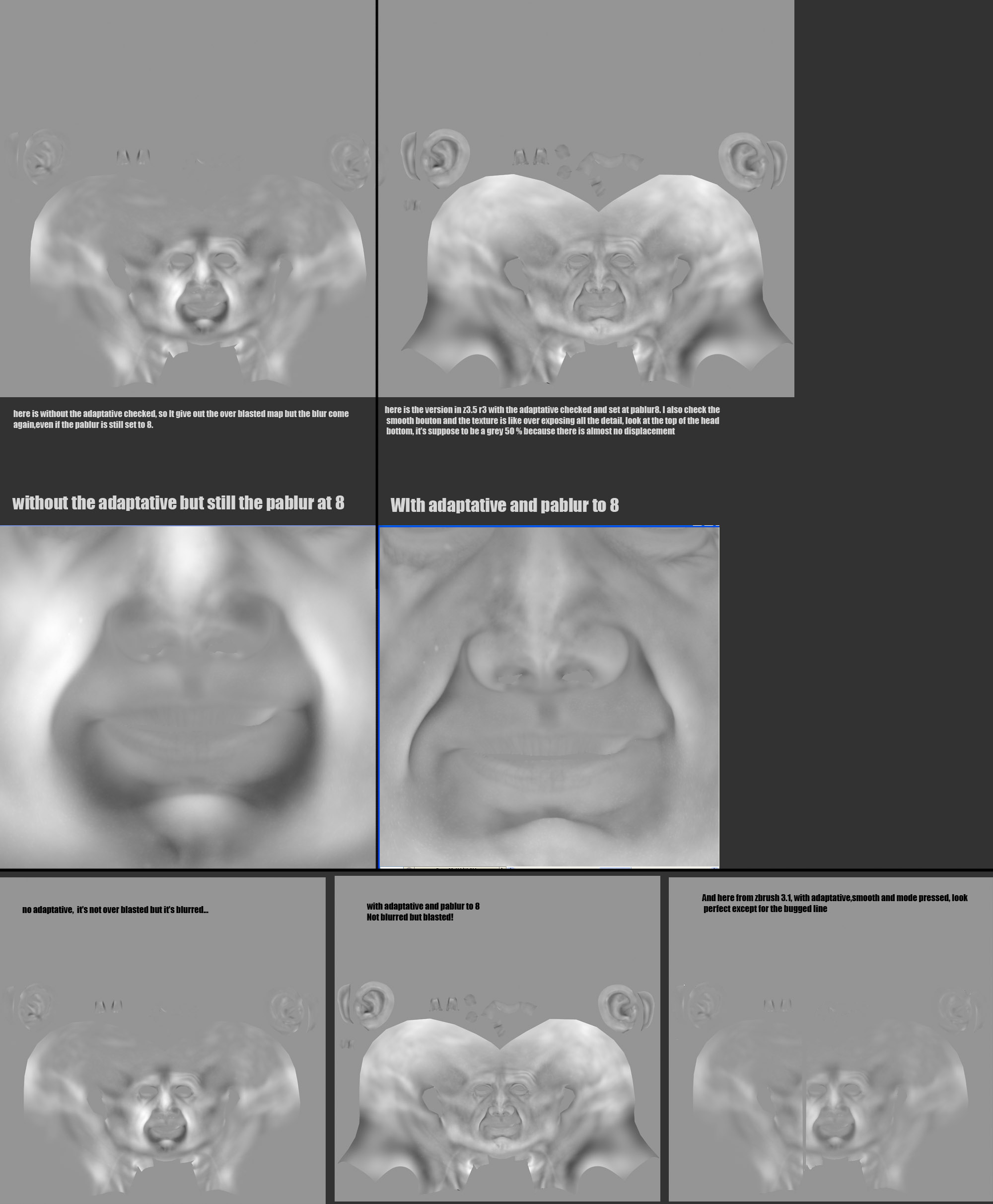
Here are my best result after 8 hours!! My map have a bugged line when generating in z3.1 ( and it’s not a uv problem!!) but other then that, the displacement map displace de mesh exactly like it should be.

On the other hand, in the 3.5 r3, it’s not doing a good job! ok the bug of the line has disapear like magic, but the map itself do not displace the mesh correctly and I have tried with 4 of my other mesh that work well in z3.1 and they all have the same problem! Look at the pictures you will understand.

Can someone clear me the situation on this please?

Pixologic must do some test like I did, they will see the bug… or I’m I missing something about that 3.5 r3?

[](javascript:zb_insimg(‘190884’,‘Montage__displace_bug_z3.5%20comparaison.jpg’,1,0))
When you use Adaptive, are you also setting Tool>SubTool>PA Blur to 8? If not, you need to.

Aurick thank’s for your reply

Ok, did not know about that pablur, I set it to 8 and yes de map is sharper in the intruded lines etc.BUT I it’s still get bugged, the displacement texture as some white area where it should not be, the map is like overexposed, so the mesh is over displaced in 3dsmax, the map do not look the same as in hte 3.1 and do not give good result, look here.

And if I’m not checking the adaptative bouton, I get a blured map like the one before, even with the pablur at 8.

Look here the maps:

[](javascript:zb_insimg(‘190972’,‘montage_z_bugged%20displace%20adaptative.jpg’,1,0))

Aurick thank’s for your reply

Sorry for the double post you can delete one.

Ok, did not know about that pablur, I set it to 8 and yes de map is sharper in the intruded lines etc.BUT I it’s still get bugged, the displacement texture as some white area where it should not be, the map is like overexposed, so the mesh is over displaced in 3dsmax, the map do not look the same as in hte 3.1 and do not give good result, look here.

And if I’m not checking the adaptative bouton, I get a blured map like the one before, even with the pablur at 8.

Look here the maps:

[montage_z_bugged displace adaptative.jpg]

Are you remembering to restore your base mesh prior to creating the displacement map?

Yes Aurick, I always do a switch morph target to get my base mesh BEFORE generating the displacmeent map, like I said, it normally work always well( except some bugs like the line I got but it’s rare) but in 3.5 r3 there is something that is broken in the code I guess, it’s not getting the right result as you can see.

I can send you the .ztl file if it can help you if you ever need it to correct the bug.

I have seen other complaining about that bug in the trouble shooting forum.

I think many peoples do not even notice it, but I’m meticulous and I see it instantly.

also, when uncheking the adaptative, the map is not overbrighten but the mesh (when the maps is applyed in 3dsmax and rendered) is like a little bit bigger, like if the displacement work like pusinh outward the mesh and not in the Z axys also.

Anyway, I let you analyse this.

Here is a more evidence of the problem, with an animated gift.

The one generated in the 3.1( I found a workaround to remove that bugged line) is IDENTICAL to the one in the canvas of Zbrush, so he’s the good one.

The one generated in the 3.5 r3, is really wrong as you cann see! Some volumes are flattened while some other are exaggerated!

And the maps use are those that you can see from the previous post, juste above this one.

And I did what Aurick tell to me, like the pablur at 8, and of course, I always do a restore morph target before generating the mesh.

so, there we go, look at this!

So… as I can see Zcentral do not support .gif or I don’t how to link them here… so here is a direct llink

http://img189.imageshack.us/img189/1728/goodandwrongsml1.gif