ZBrushCentral

Cleaning up really messy polys, any quick tricks?

Hello, I did some projections over a model recently and it all went more or less smoothly except that around the eyelids, which are holes in the mesh, the polygons at higher subd’s become a huge mess.

I am cleaning them up by hiding most of the mesh and manually moving the polygons into the position with the move and nudge brushes and then filling them in and levelling them out with varying doses of the clay, flatten, and smooth brush but as I am doing all of this I can’t escape the feeling that there’s probably a better way to fix things like this up.

Is there?

Thank you in advance for any help, it seems like ZBrush really doesn’t like holes sometimes. I’ll have to remember that.

Attachments
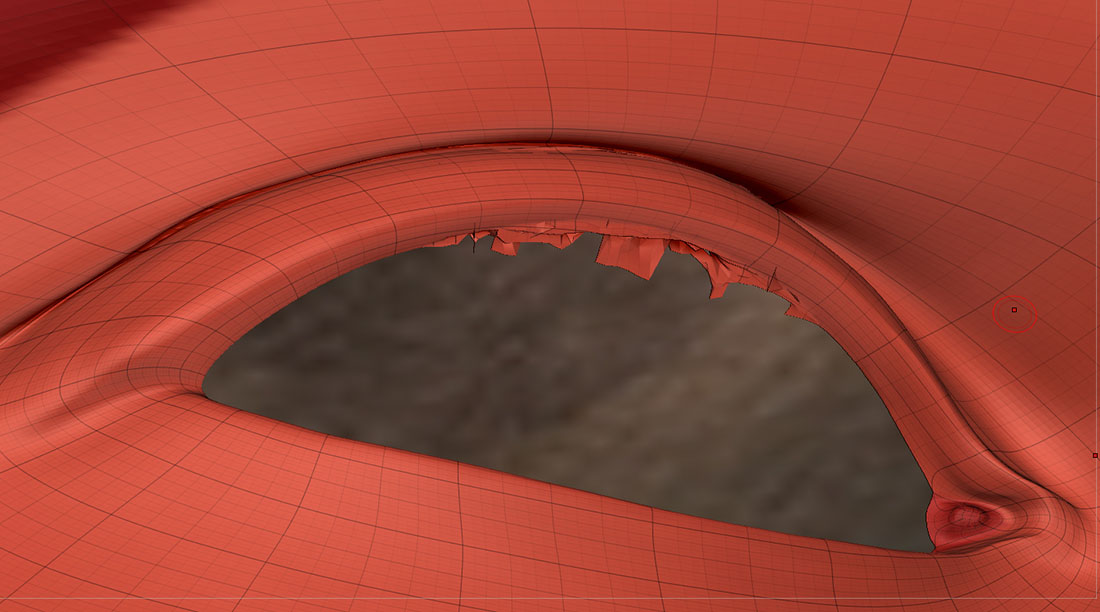
distorted_eyelid.jpg

i will use clip brush first.or slice brush to cut the mesh into new polygroup and del it…

But I don’t really know anything on the best way how to replace the deleted geometry…

I’m hesitant to try to reconstruct it in Maya via GoZ and then reproject it because projection is what seems to have caused this mess in the first place.

did you try zremesher?

For anyone else who had the problem, I found the answer,

"You should be able to smooth out edge borders in Zbrush by going to your brush menu>smooth brush modifier>min connected (move from 3 to 1). "

http://www.polycount.com/forum/showthread.php?t=115351

repost.