ZBrushCentral

Clean / Smooth a rought border of a scan

Hi,

I am looking for a possibilty to smooth or clear the border of a scan, without loosing the exact position of the border. Something like clicking a curve on the highest borderverts and then all the other bordervertrs snap to that curve to get a nice clean border.

Any suggestions ???

Attachments
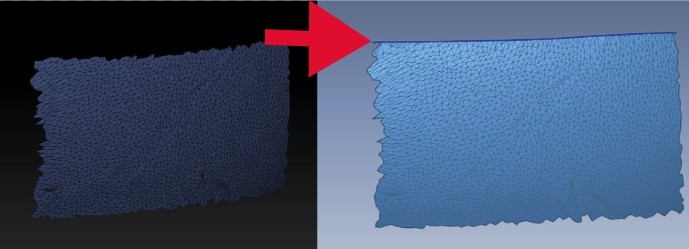
border.jpg

Use the slice curve brush. It will split it into polygroups and you can delete the unclean side, leaving a clean border.

Hi,

thank you for that tip. That works. But - if I cut a piece of the border it will be too short.

I look for something to clean up a jagged border to the original position/length (the part on the pic. is only a sample!)

There are always various ways of achieving the same end result. Million ways to skin a cat, etc.

It’s hard to say exactly without seeing or knowing more detail of what you’re trying to achieve. After the cut and delete you can use the transpose tools to adjust back to the original size with the fresh clean cut border.

Like I said though it’s a bit hard without knowing what exactly you’re after.

I would probably just slice off the rough edges from the plane and then resize it, either with transpose or in deformation>size.