ZBrushCentral

clean selection

Hi
I’m trying to follow a tutorial, Pixologic_Zbrush_Zclassrom Digital Sculping_transpose
Specifically about creating extra loops with transpose using shift=ctrl
I cut the geometry with the slicecurve and then hide one of the parts, select all, and unhide again.
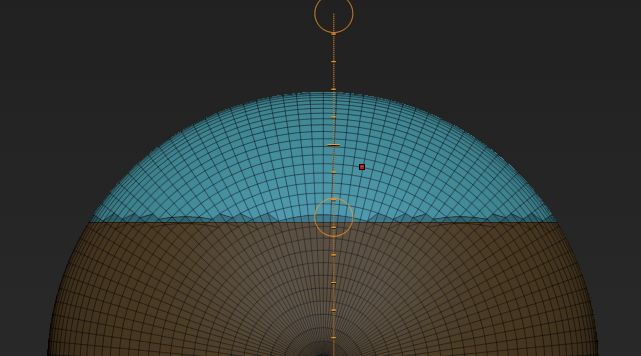
I’m trying to use transpose move tool to move and at same time create the extra loops. But they are created in the soft edge of the selection instead in the clean cut, creating a irregular edge. I follow exactly the video. Any suggestion? Thanks.

Attachments
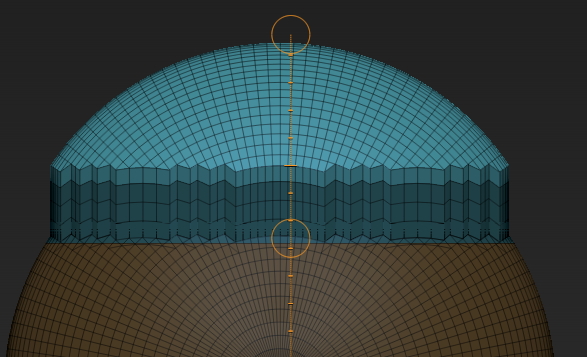
Image 788.jpg

Image 790.jpg

Actually, you are not following the tutorial exactly. When he hides the bottom polygroup, he completely masks the top polygroup then un-hides the bottom polygroup then inverts the mask. What you are doing is hiding the bottom then inverting the selection then masking the bottom and unhiding the top. It’s an easy mistake, he does move very fast.

This is what I get. BTW, what version of ZBrush are you using?

new-2.JPG

You are absolutely right. Thanks a lot. It would have taken me a lot of time to understand the error.

I have used R6 and then when discovered the problem tried R3 with identical results

It is yet confusing for me why the exact steps make any difference. You would think that when you select something would react consistently. But this is secondary as long as know the steps.

Ok, now I realize the reason. The move tool will create the loop in the external edge of the selection. Because the selection has anti aliasing only one of the sides will have the correct selection.

It is weird that when “selecting all” in a geometry is yet selecting parts of the hidden geometry. This looks rather unnecessary.
Also than the anti aliasing affects one of the parts but not the other, in this case the hidden part.

Is there any way to control this apart of workarounds like this? Or perhaps I’m missing something.