ZBrushCentral

Clay buildup brush jaggier than I expected...help?

I’m new to ZBrush, so it’s quite possible I am doing something wrong, but I am quite surprised at how jagged my strokes made with the default square alpha clay buildup brush are. I’m trying to sculpt (non-realistic) fur onto this model using clay buildup. I’ve got a Wacom tablet. My mesh is subdivided to about 1.8 million polys. Under Brush settings, I changed my tablet pressure focal shift to 52, and I’ve got lazy mouse set to .04. Everything else is the default. Am I doing something wrong, or is this supposed to look this way?

Thanks in advance.

Attachments
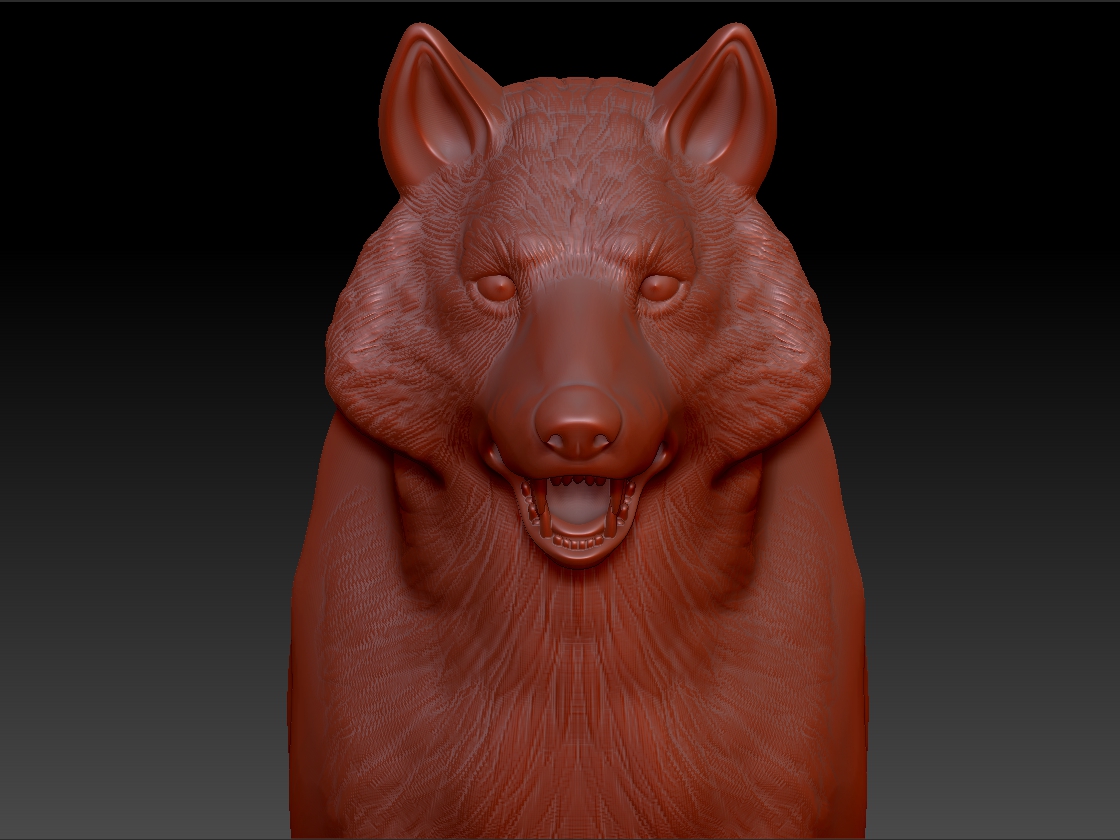
ZBrush Document.jpg

looks normal.
you need to remember that a mesh with 1.8mil is a relative number. Mesh density can change across the surface of a mesh, so you could have 1.6mil in the face, and .2 mil for the rest of the body. The reverse is also true. From the looks of it your mesh just isn’t dense enough for the type of detail you’re trying to add. HD geo or another subD or 2 should fix that. Most single meshes…more so if they have hair and fur or very fine details like skin pores will end up around 12mil for me usually.

Also, redwax is the devil.

Thank you so much, that’s super helpful. I’m used to Blender sculpting, which really only lets you use 2 million polys at the max, so I figured that would be enough. I’ll jump it up a few more levels of subd.

Why is red wax the devil?

redwax is the devil based on it’s display of shadows and specular value. If you go to the download center on pixologic.com and look for a nice matte material you’ll probably enjoy looking at your model more, my 2 cents.