ZBrushCentral

Circle Clipping Brush not working as expected

Hello all,

I think I am missing something. I have looked all over the place here, and can’t seem to find an answer.

I have a shape created from shadowbox, and I am trying to use the circle clipping brush.

However when I use it by holding the Ctl and Shift key, The whole mesh shrinks to fit into the circle???

if I hold the alt key, I get part of the mesh filling the area I was trying to clip??

Like so:
[clipping_issue.jpg](javascript:zb_insimg(‘240749’,‘clipping_issue.jpg’,1,0))
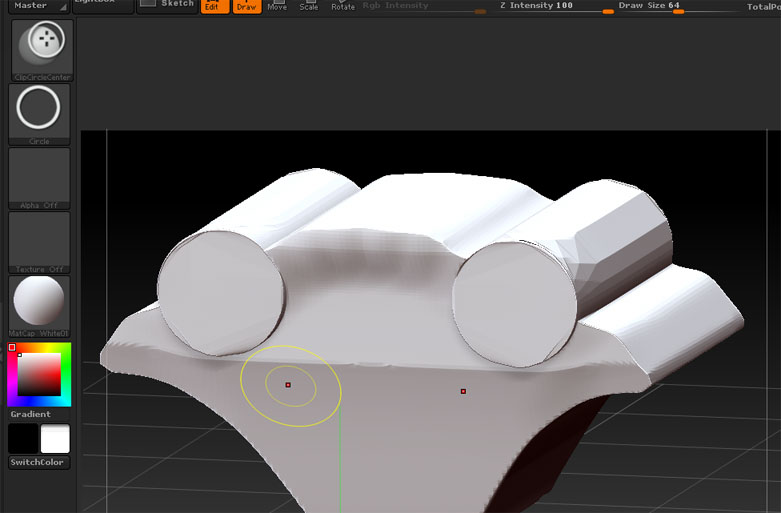
Can anyone offer a solution? or is this how it works?

I can use the curve clip, however this is not easy to make a perfect circle clip… if that makes sense.

See “Clip Brushes” starting on page 42 of the ZBrush4_whats_new.pdf in you ZBrush 4.0/Documentation folder.

In doing a little testing it seems that for it to work as you desire the center of the circle clip brush needs to be off of the object (the red dot or center needs to be in the blank canvas area, not on the mesh object) and then hold the alt key as well.

Hmmmm Seems to be a bit temperamental. Sometimes I can get it to work as you say. sometimes it’s a law unto it’s self.

I’m sure there is a knack to it.

Still thanks for your help! :slight_smile:

I know what you mean. Sorry, I have no solution, but I was wrestling with that exact same thing today.