Hey! I was wondering if it was possible to change your UV layout slightly after you have completed your sculpt. No new polys would be added I just want to move some verts and use relax to clean up my uvw layout. My sculpt is fiinished with alot of detail at the highest subdivision and I don’t want to lose this work. I’ve found a small artifact in my displacement map which I believe is being caused by a uv problem.
Yes. At level 1, store a morph target if you didn’t before subdividing the mesh in the first place. (If you did, then switch to the stored target.) Now import the version of the model with the new UV’s. This will update the UV’s, but not affect the geometry. Be sure to switch morph targets again before returning to higher levels.
Thanks Aurick!
Hey Aurick! I think I missed a step. I stored a morph target and exported the obj to fix the uv’s then reimported the obj fix. I tried using the switch on the sub d 1 morph panel but my mesh explodes. Is their a step I’m missing?
What that means is that one of your settings in the app you used for UV mapping changed the point order of the model. This is usually an import setting, but sometimes export.
im gonna say MAX.
export out level1 from Zbrush
import into max
export out of max
import back into max
make changes
export to Zbrush
follow auricks steps, that should work…stupid autodesk
Good guess Goast666:) It’s Max 2009. I repeated the import/export and it worked! Thanks again - you too Aurick!
exact same problem and this double back and forth helped.
just wondering: is there any option to make max not mess up the vertex order, so I could avoid having to export back and forth?
cheers
depends on the version of Max you’re using.
max 9, quads, 6, cords I think…
max 2009, turn off everything but texture cords.
…
don’t have 2010, can’t tell ya on that end.
Hey Goast666, thanks for the advice.
I am using version 9.0 or 3DSMax, but playing around with all kinds of different import and export settings still does not prevent the model from blowing up after switching the morph target.
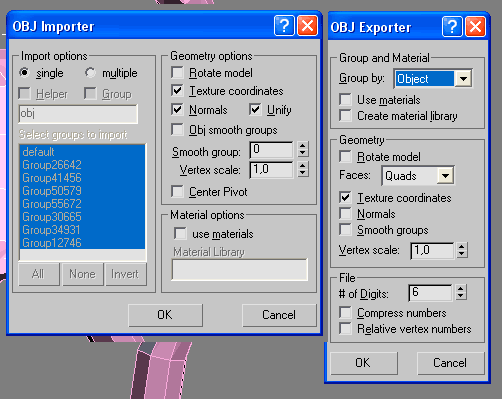
Attached is settings I thought would have worked, given your advice, but as they don’t, maybe you spot a mistake in these settings that is hidden to my novice eyes?
[ ]
]
Appreciated loads!
seems good to me. Turn of unify in your options.
also, in Zbrush. go into preferences>import/export> turn EVERYTHING off.
Then try to get something into Zbrush. Chances are you have some flipping going on during the importing and exporting which may be changing your point order.
Well I’m using 2009, but I’ll tell you what I do and it works for me. I skip all the morph stuff. I don’t store a morph target. I just import my obj to slide in the new UVs, and I dial my subdivisions all the way back up. Viola. But that’s assuming your point order remains consistent.
At one point when I was going through this same particular learning curve, I just did my best to keep track of a few specific vertices on my mesh…like jot down their specific numbers or IDs. So if there’s ever any question of whether my asset is jacked or not, I can always go back to those reference points. I would just pick a few that I knew would be easy to find again. It sounds paranoid perhaps, but it’s been useful.
Well…if it makes you feel any better I can break objects using max2k9. I never could with max 9.
Kinda makes me glad that I use XSI on a regular basis.
Seriously though…I just did a video for my class and didn’t have any problems, then I do up a quick one for you and I either break the welding on my UV’s on import or I can explode the mesh. Using the exact same steps for both of them creates different results.
I’ll dig into this some more.
I think this is the sort of thing that makes GoZ shine. I haven’t used it, but in theory it’s a good idea…assuming it isn’t quirky or restrictive or both.
Alright, thanks for all of your input.
I am still having problems with this, being stuck with this for days, and the only work-around being to just double import-export seems just ridiculous.
I just have no clue any more what to try, really appreciate any help.
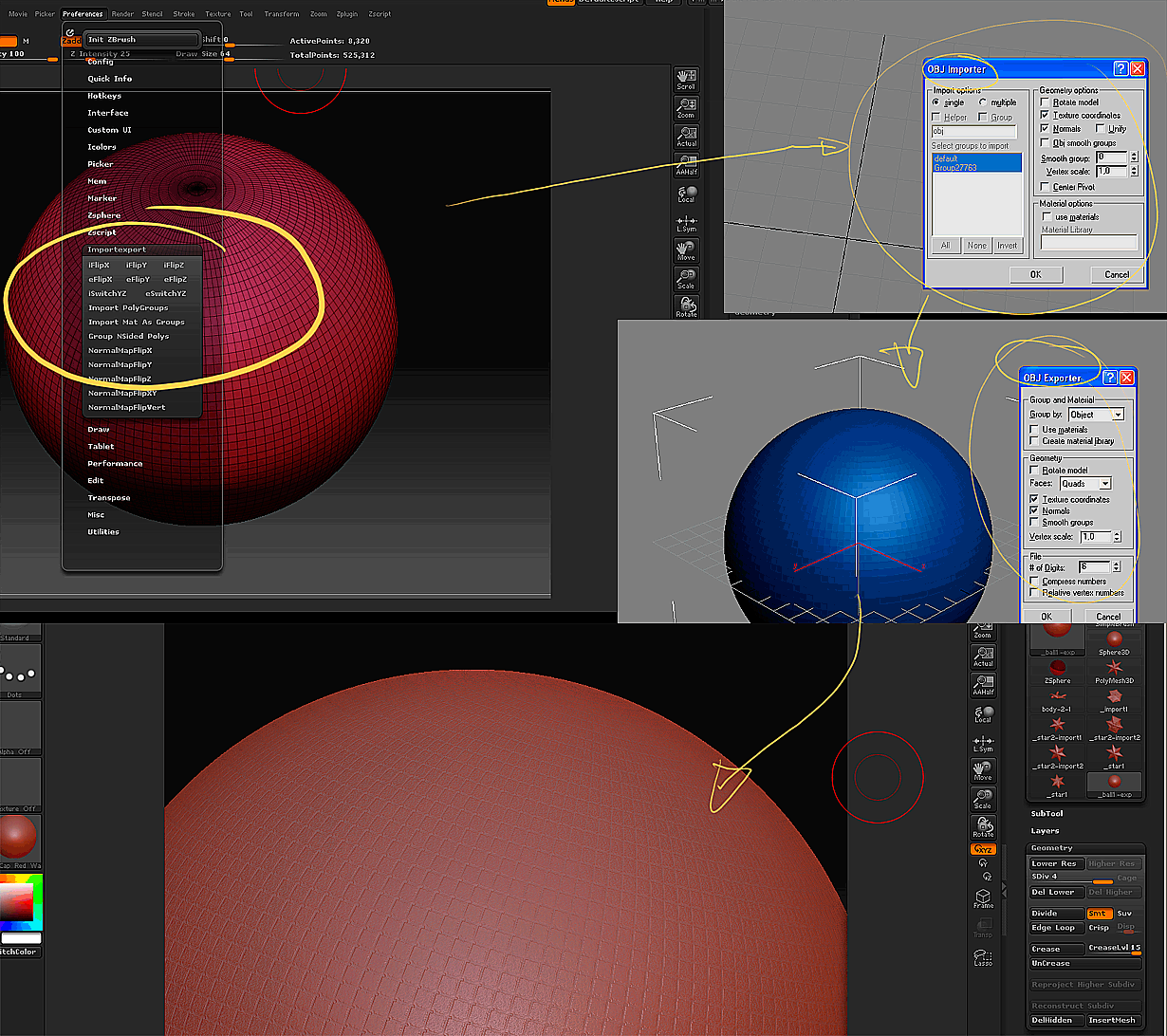
Attached you find screen shots of my steps: A simple object in ZBrush, all import-export option turned off. Importing in Max I used those (and others, with same result) options shown. For this testing, I did not even tough the object in Max, just exported right away, with the options shown. In ZBrush, I go to SDiv 1, Save the Morph Target, import the file just exported from Max, and Press the Tools:Morph Target:Switch. Upping the SDiv then gets me those odd creases at the edges of what seems to the be geometry at SDiv1. With a regular object like a sphere, this looks somewhat less dramatic, but with detailed models, especially with sharp edges, this really blows them up.
[ ]
]
Anyone any clue what’s going wrong here?
Cheers