ZBrushCentral

Changing stitching type on imported .obj sculpts?

Greetings everyone!!!

Importing into Zbrush an obj file that i have been worked earlier to other program, the problem is just that imported sculpts are shown as if they were made with plane stitching. Which means there’s often a hole somewhere in the sculpt, which of course screws shadows and textures up rather a bit.

Does anyone know if there’s a way to change the stitching type on existing sculpts in Zbrush or how to fix the hole-line in the sculpt?


>!!!MindFunk With ZBrush_!!!<

Attachments
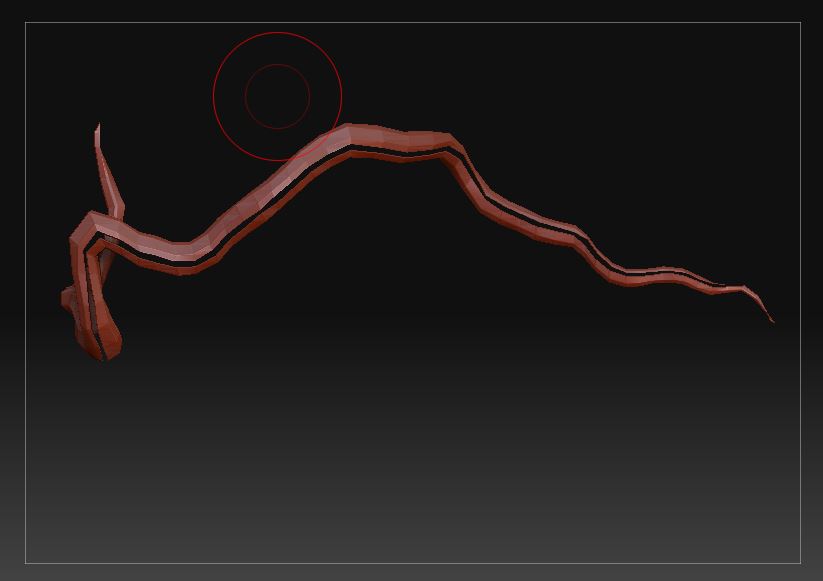
Καταγραφή 1.JPG

pics or it didn’t happen.

Go into Display properties and try invert or double. What software are you trying to bring it in from? I had to apply a mesh smooth 5 times in 3DS Max to get a sculpt into ZBrush which resembled my model there; It needed to be tweaked thusly. Hope that helps. And oh yeah, pics help.

Changing stitching type on imported .obj sculpts?Greetings everyone!!!
Importing into Zbrush an obj file that i have been worked earlier to other program , the problem is just that imported sculpts are shown as if they were made with plane stitching. Which means there’s often a hole in the sculpt, which of course screws shadows and textures up rather a bit.

Does anyone know if there’s a way to change the stitching type on existing sculpts in Zbrush or how to fix the hole-line in the sculpt?

Καταγραφή 1.JPG


>!!!MindFunk With ZBrush_!!!<