ZBrushCentral

Cavity Mask Alternative?

Greetings
Looking for advice from the helpful ZB community to solve a Cavity mask issue.

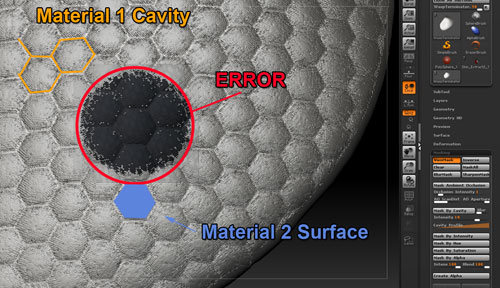
Trying to place 2 different materials on sculpted geometry.
Material 1 = cavites
Material2 = Surface

The problem is, the Geometry has baked in surface detail , so the cavity Mask will mask also the surface.

Cheers!

Attachments
ZB_CavityMask.jpg

you can try to mask by AO.

How did you put down the hex pattern? Did you use an alpha map over UVs? If you did you can just use that same texture to mask the object again.

I used a Stencil and then Standard Brush + Drag Rect + ZAdd
as far as I know i only had Poly Paint ON (no UV)

Ahh. You’re going to have to do it by hand then if mask by AO doesn’t work.

hmmm mask by AO you say? I’ll give it a try.
THAT WORKED! great idea, thank you!
By combing the two methodes I was able to get a good mask.

WorkFlow
Step 1
:large_orange_diamond: Mask AO
Occ Int = 10

Step 2
:large_orange_diamond: Blur = 10
Mask by Intensity = 50

glad it worked.

Next time you can save out masks by giving your model some UV’s and then making a new texture from the mask (in the texture panel if you don’t know…maybe masking…not sure). Anyway, as long as you don’t change the UV layout that is associated with that alpha texture you can pull back that mask…or any other, at any time in case you need/want to change something post.

it’s also great when you can combine masks together in this way as well…just need a bit of PS work…though I think you can do it in Z as well.