ZBrushCentral

Can't get sculpting function to work

Hi,

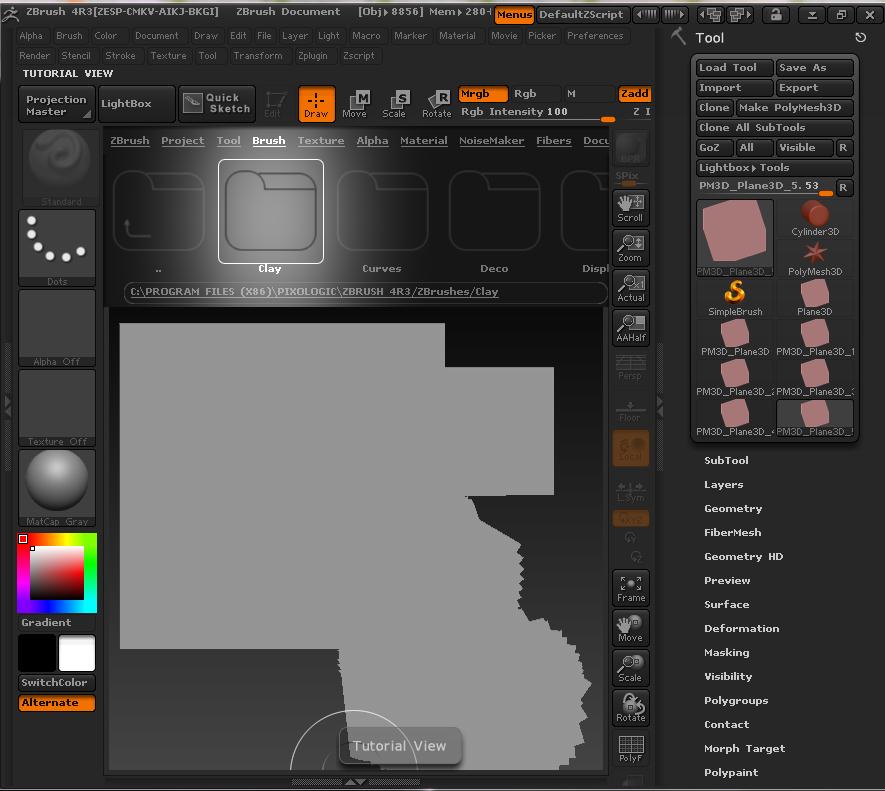
I bought the book Zbrush Character creation by Scott Spencer. I’m trying to make the lion head in the tutorial, but am stuck on the first step. He tells me to create a Plane3D, make that a polymesh 3D. Then begin sculpting. I don’t get anywhere. I have attached a screenshot which shows what happens when I try to sculpt it.

Very grateful for your help,

Kirai

Attachments
ScreenShot004.jpg

You’re not in Edit mode. You’re in Draw mode, which means that your plane is a paint brush for adding pixols to the canvas rather than an editable object. After drawing the plane you must press T to enter Edit mode. When you do, your cursor will turn from white to red.

Thanks man,

worked :+1:

With that setting, I find sometimes it wont let you switch to edit mode (even if you only click only once when drawing). You may have much better luck switching the stroke type from ‘dots’ to ‘drag rect’. Then it is a lot easier to draw out the model once, and switch on edit mode as suggested.

You can use Ctrl+N to clear the existing document to get rid of all those pixols and focus purely on whatever model is in edit mode.

Thanks for the help and advice guys, have got it working properly :+1: