ZBrushCentral

Can't find Marker button

I’m trying to follow a tutorial and it says to set a marker, but the marker button is not under the Transform menu. According to documentation and a screen shot I’ve seen, it should be right next to the snapshot button, but is suspiciously blank on my copy of 3.1
Anyone got a line on this one?

Attachments
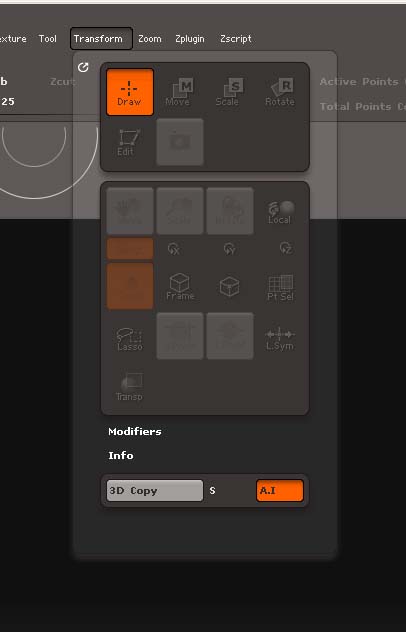
Marker_Missing.jpg

I don’t remember the Marker button ever being in the Transform palette. Anyway, in 3.1 it’s in the Marker palette. :slight_smile:

Damn, I must be blind. I should have scrutinized the menu bar more closely. I just started using ZBrush day before yesterday, so I don;t know where it’s supposed to be, but the ZBrush Practical Guide and the online documentation say it’s in the Transform menu, so someone might want to correct those…

See attached image for the entries in question.

Thank you for cluing me in.

Attachments

Marker_Missing_Manual.jpg

Thanks, I think some of the documentation from an earlier version has got mixed in unedited. Incidentally, I think the Practical Guide you refer to will be for ZBrush 2 and so is out of date. And do you have a link to the page you show from the online docs? I couldn’t find it.

Thanks

Yea, it is for version 2, but I couldn’t find one for version 3. Seems they decided to go the lazy rout with live documentation instead of updating previous support material. Some frustrations, trying to get around the differences n a completely unfamiliar piece of software; however it does give me enough to get the job done and leads me to an informed decision as to weather it’s worth my money. I th9ink it will be, but this is only my third ay with it. !)

Here’s the link to the online doc.
http://www.pixologic.com/docs/index.php/Marker

Seems my posts take hours to post. Is there a moderator previewing these posts or is something funny going on?
