Sorry, I was away. Um, I’m just eyeballing this. You could superimpose the viewport against the profile of an actual Bball and trace it much more accurately. But the idea is to get some clean slicing, and from there you can go a dozen different ways. I use the slice curve brush, because it slices cleanly. The circle will leave jagged edges. Remember, pressing alt while drawing out the curve inserts a soft bend, double clicking alt inserts a stiffer angle. Start with a miedium high poly sphere with decent topo (not a primitive pm3d sphere with the poles on the end–those cause problems–clean it up first by running it through dynamesh then Zremesher respectively, and subdiving as needed).
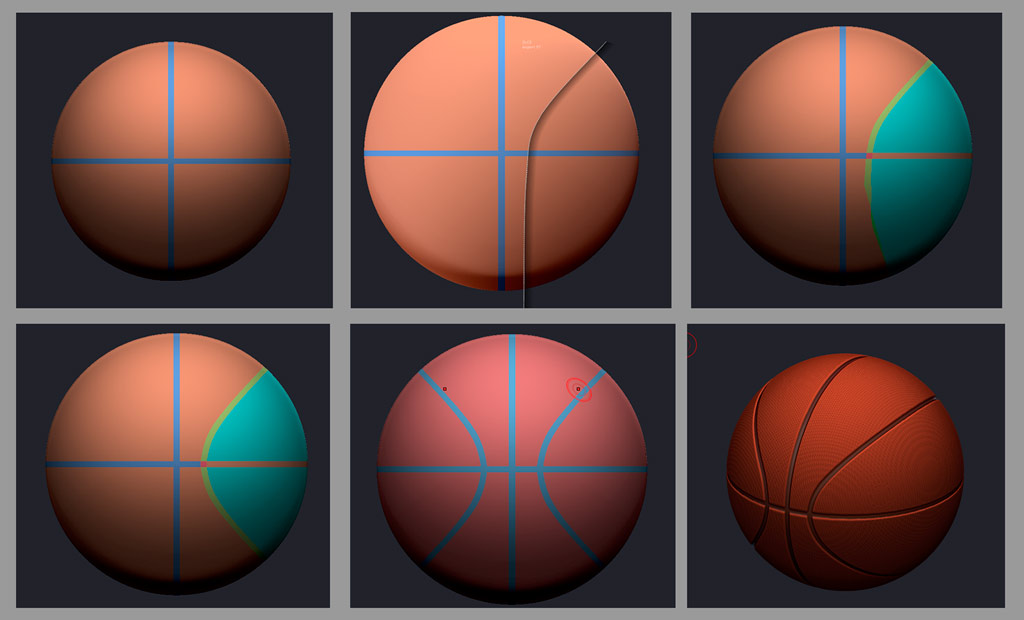
Remember, you only need to get one quadrant right. The rest can be Mirror and Welded (Tool>Geometry>Modify Topology>M&W). If it’s mirroring the wrong side, flip the geo first with the Mirror command in the deformation menu. Group the polygroups as you go by hiding them, and using “Group Visible” on the visible portion. So you’ll do a M&W across X, Y, and Z axes by the time you’re done. Once you’ve got those clean line slices, make a duplicate of the subtool, and save a copy. You can now go in almost limitless directions, and you can always get those clean lines back if you have that tool saved. Some things you can do from there:
-fill the line polygons with black, and the body with white polypaint. Use this to transfer those lines to another UV’d model as polypaint. Polypaint can be converted to masking. A UV’d object can generate an alpha, texture, displacement , or normal maps.
-Generate an alpha
-generate masking
-invert the lines as masking with a slight blur to run positive and negative Deformation> Inflate operations on the model on the lines and body respectively.
-Use line masking to protect the lines from a surface texture you apply .
-Shift-ctrl click on the line polygroups to hide everything but them, and run a Tool> Edge Loop> “Extrude Edge Loop” with a slight negative value to recess the lines with additional geometry.
-Use the polygroups to play with the Panel Loops function
Everything else is up to you to figure out. Good luck!

 :
:
