ZBrushCentral

Can fibers pick up uv position or color from the mesh it was created from?

Hello,

I am doing a project where I want to make fur for an animal using fibermesh. I want to put the same colors on the fur as are on the underlying mesh. For example if I have a model of a cheetah with textured spots applied as a uv texture map to the base mesh I would like that color map to color the fibers as well. Is there a way to do this? Ideally I would like each fiber to be represented by a point in the same uv map as its parent mesh. That way I could take the fibers into another 3d program and render them with my existing texture.

Thanks for any help,
-Joe
With Polypaint, you can lower the Tcol (Tip Colorize) slider to 0.

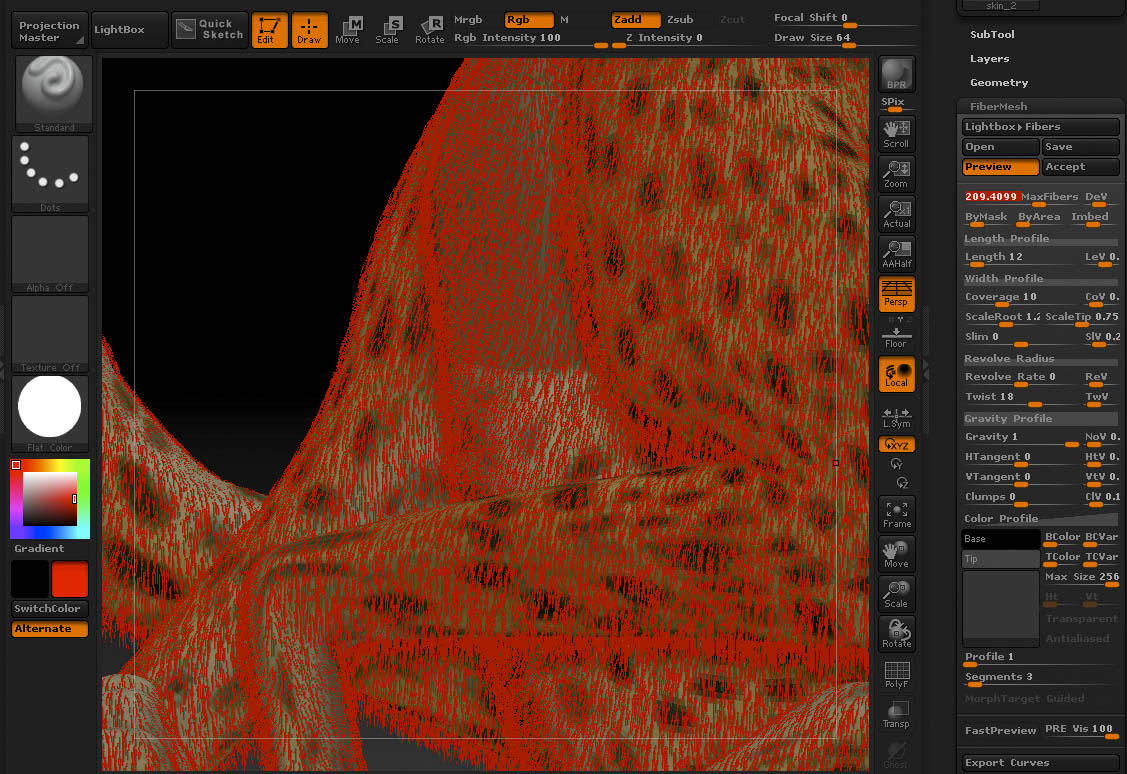
Thanks but I have not been able to figure this out even given the above information. This page: http://www.pixologic.com/docs/index.php/FiberMesh_Workflow says that the fibers will take their color from the polypainted mesh the fibers are created from. I have not been able to get that to work so far. You can see in the attached image that the fibers are taking their color from the color chip on the left and not from the underlying polypainted model. I have the TColor slider set to 0 as you suggest.

Any more suggestions would be greatly appreciated.

Thanks,
-Joe

fiber_problem2.jpg

It looks like you have Base Colorize (BColor) turned down to 0. Turn up BColor and try it again.

Yes your are correct. I did not understand that the BColor slider showed the base mesh color. I assumed that it showed the color of the base color chip to its left.

Now that I have my fibers colored I just need to figure out how to export them to Lightwave. Any idea on how to do that?

Have you read the 4R3 PDF in your ZBrush installation’s Documentation folder? This was covered in there. Page 47.

Yeah, only touch the Tcol; Bcol should be left at it’s default value or higher. Changing the Color Profile can also help to get rid of any further color blending (which may not even be noticeable at times, but using the flatcolor material can help it stand out more). Just slide the the curve to the top left corner (H=0, V=1) and you should pretty much get pure polypaint colors.

For exporting, the easiest method would be if Lightwave supports importing vertex colors along with the obj. I’ve never used LW so I can’t verify it, but I’d try looking under Surface Editor: Advanced Tab: Vertex Color Map to see if it has retained the vertex colors. If not… I’d hesitate to suggest UV’ing the fibers as that could give your computer a reason to hate you depending on number of vertices that it would have to try and burn through. And as always, the suggested documentation could be a big help too.

Well you caught me. I did not read the documentation before I asked my question. But if you are talking about the ZBrush4_R3_whats_new.pdf I did not see any mention of the coloring of fibers based on the parent mesh color on page 47 or any other page in that document. I don’t have any other 4R3 documentation so if more exists I would like to get a copy of it. It is covered in the ZBrush4_R2b_whats_new.pdf. But it is mentioned so vaguely that I think it would be very hard to find out how this feature works by reading that document.

Thanks for the idea about the vertex color map. I was excited about that but it turns out that Lightwave does not read the vertex colors from the .obj file. And even if it did it seems like Lightwave’s fiberfx rendering system wont use a vertex color map as a way of coloring fibers. I think Pixologic could add another useful uv feature to fibermesh. It should allow the fibers to inherit the uv map from the mesh it is created from. Each fiber could have all its points collapsed to one point on the uv map. That way the parent mesh’s texture could be used to color the fibers in other 3d programs.

Thanks for the help,
-Joe