ZBrushCentral

Can anyone PLZ help me???

Hello friends
This is my first time here at zbrushcentral :smiley: .I need an emergency help from u guys.
I have modeled a spawn character in zbrush.It is almost finished with the final .ztl file size of around 750 mb.There are around 10-14 subtools each having
a subdivision level of 7-8.
Finally i want my model to be rendered need some turntables of the model.But
since the model is heavy i am not even able to move the model with all the subtools with its full divisions.I am struggling with this for weeks and is really dissapointed withought being able to see my renders.
Is there any bounding box(as in maya) type option in zbrush???
how can i overcome this situation???
one more problem is im using a quadcore pc with 4Gb of ram and windowsXP OS.
i tried increasing my RAM to 8 GB. Still showing same performance.In preferences
im memory option even if i increase the ram to 8 Gb it is showing only a max of 4 Gb. :confused:

Somebody Plz help me to solve me with this issue???
I would be greatful
Thank you

Have you tried to reduce the polycount with the new Decimation Master? :slight_smile:

Download+more infos here:
http://www.zbrushcentral.com/zbc/showthread.php?t=71265

Another possibility is splitting each SubTool. Then you´ll be able to work much faster.
The problem is not that you have 10-14 SubTools. I think the polycount is just too high.

Regarding the hardware problem – Are you sure your system supports 8GB RAM? I have 4GB RAM and Zbush can use only 2GB. The rest is for windows and other things (not sure for what exactly :slight_smile: ) so I guess you can´t use the full 8GB RAM even if your system supports it.

Do a search with Zbrushcentral´s advanced search feature. Keywords such as RAM, Preferences, memory will help you to find threads where people asked similar things.

Hope that helps.

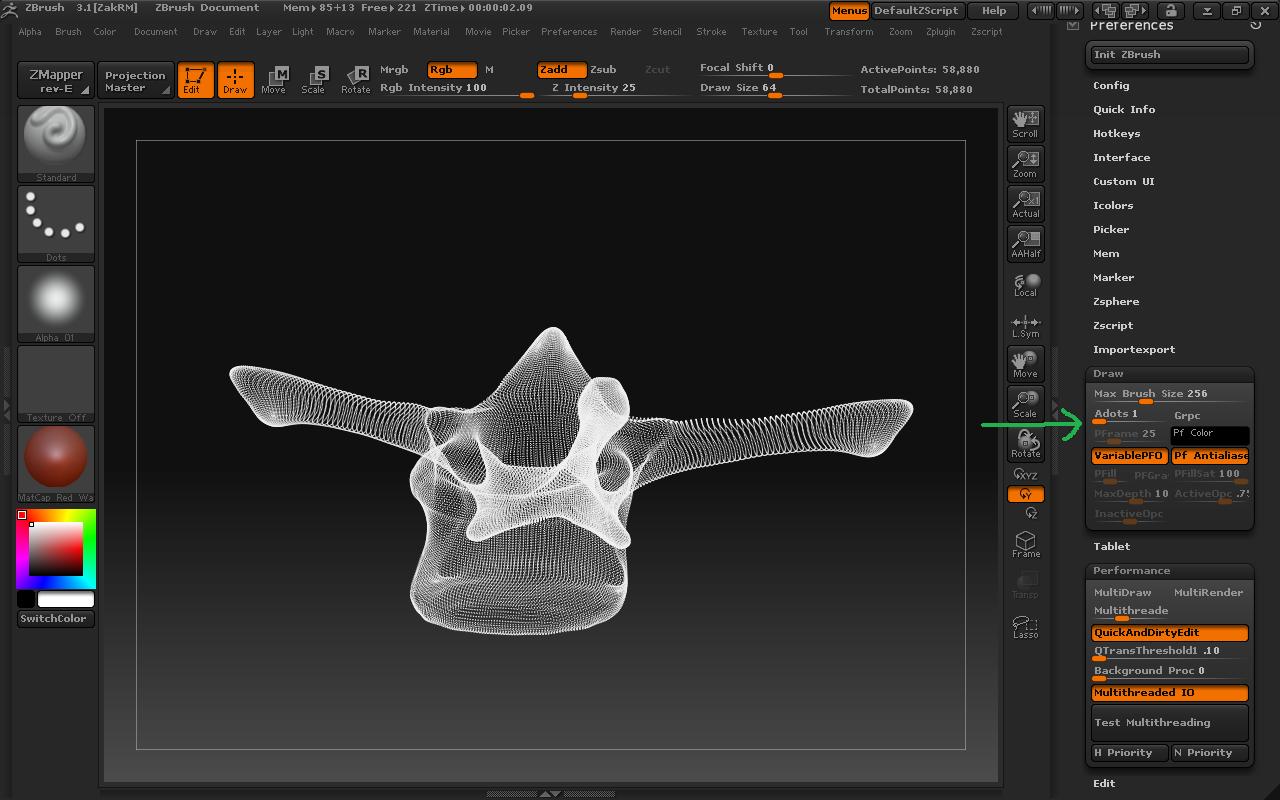
You can adjust the Adots setting, it lets you move aroud heavy tools with subtools displaying them in points mode (Much lighter than a pre render). Set the adots setting down to 1…

[Adots.jpg]

You can also enable the multithreading (performance > Multi Draw and Performance > Multi Render) for better performance on your multiple core system

Thank you! I didn´t know that. :slight_smile:

Thank u ISK-86 and moni:D
I think Adots settings will help me…and i think i can also use decimation master for further reducing my polycount.

one more question left…
why doesnt Zbrush utilise more than 4GB of Ram???
I am working on 64 bit XP OS …
can anyone say me what is the max memory settings for Zbrush…??