Hey guys, I’ve got this weird problem…the buttons at the right side run off the screen…? Does anyone have the solution to this? Because I clearly don’t!
Thanks in advance!
Attachments
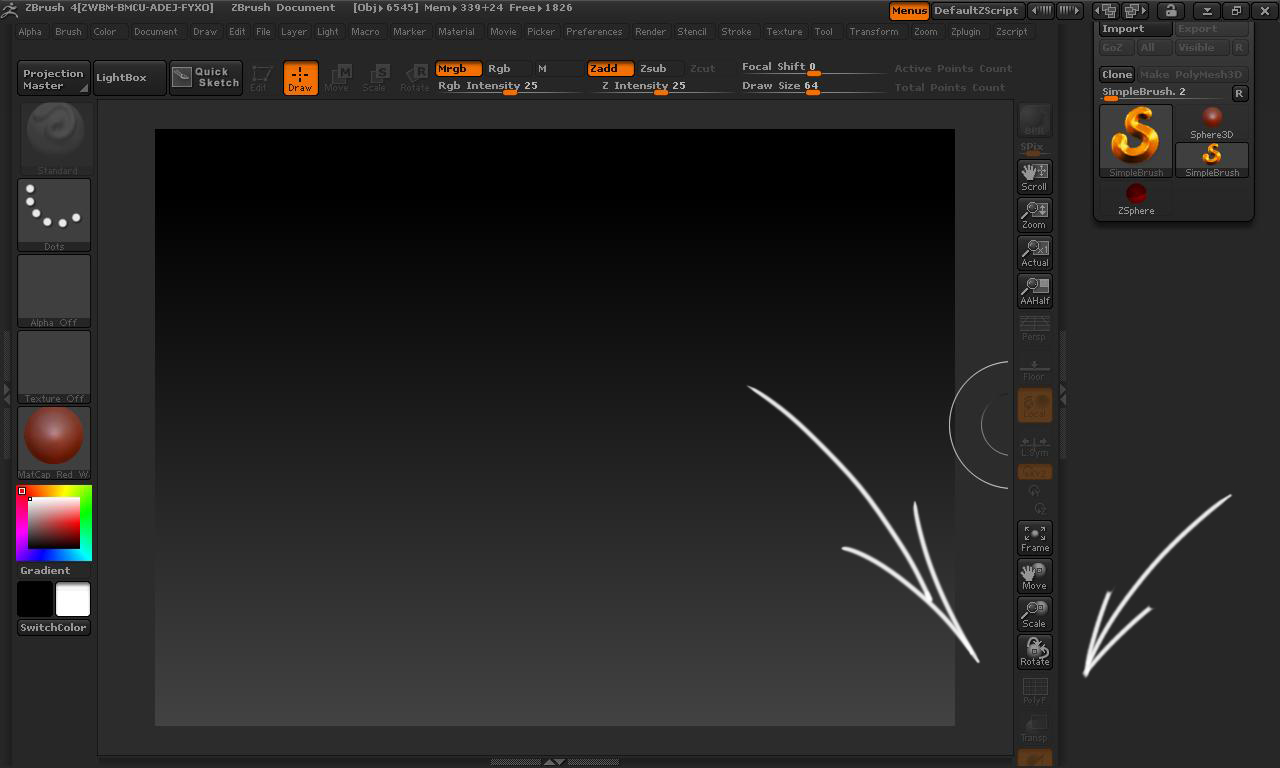
Hey guys, I’ve got this weird problem…the buttons at the right side run off the screen…? Does anyone have the solution to this? Because I clearly don’t!
Thanks in advance!
Are you running maxmimum screen resolution for your monitor?
I have a 1280 x 768 resolution on a 16:9 screen…
That’s the maximum for your monitor?
No man, the maximum is 1920 x 1080 , by the way…Zbrush 3 worked fine 
With 16:9 aspect ratio if you are going to run in that range should be 1280 x 720. Do you have a setting for that resolution.
hahah yeah man but that looks very crappy  I’ve never had problems like this before though…?
Something else you can try is right click on your ZBrush shortcut and select Properties and set ‘Run’ to Maximized. Otherwise, I would try increasing your resolution.
Ok so I tried to set ’ run ’ to maximized, but that didnt work, and changing the resolution only makes the problem worse is there any way that I could loose some of the buttons there (because there’s a bunch of the there that I’m not using anyway) so that the ones i do use scoot up?
You can enable Custom UI in Preferences and take some out, but the ones on the bottom aren’t going to scoot up by themselves. You will have to move them.
So frustrating! nothing of the above is resolving the problem! tnx Zber2 for your advice, other tips are still welcome!
The only other thing I can think of is clicking the Restore button in top right corner. Right beside the X to close the program.
Hahaha nope! didn’t work also…really the only real problem about this is that my transparant button is down there! is there another path to get to this buttons? because it wouldnt solve the issue but it would make it way easier to live with 
What! this actually worked hahaha! thanks guys!
By the way, if anyone else having the same problem reads this, I have a 107 cm screen so it’s not just a solution for small screens!
Again thanks alot for the effort guys! 