ZBrushCentral

butterfly vertex problem

Hi
Please so you know how would I fix the butterfly vertexes proble on m y topology in Zbrush? It is possible? When I go to Maya and fix this, Zbrush dont accept my obj because I do 2 vertexes from one vertex you know…
Please how would you solve thid problem?
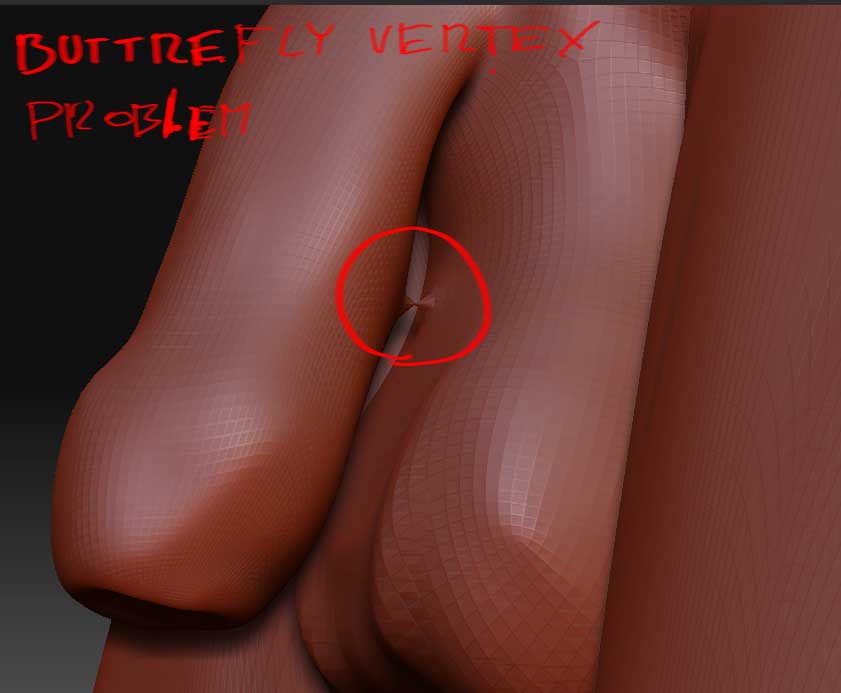
problem.jpg

You can’t, if the vertices are welded - like you said you would change the total number and ZBrush won’t accept it.

Why do you need to solve this anyway? It’s…behind an object and won’t be seen, unless you are animating this!

Yes I want animate it after. I found out this problem when i wanted to do UV layout in Unfold3d. This software told telling me that my mesh is invalid due to buttrefly vertexes and refuse working with it. :confused:

what you can do is export the mesh to a 3d software [like maya or max] and quickly fix the polys or retopo in zbrush. Then import the new mesh back to zbrush, subdivide the same amount of times as the original, append it to the original and use the project all function to re-project your details onto the fixed mesh and you’re done :slight_smile:

Yes I’ve tryed this retopologize process. Unfortunately every attempt was wrong :cry: Firts the import obj (the unbutterfly obj) function didn’t work, because the new mesh didn’t apper. And I absolutely didn’t know why. Then I had luck and obj appeared. After I’ve tried project detail with various options but with every attempt bad flying vertexes appeared and I don’t know how manage it. And mesh was also disturbing manily in the face. I wanted to give here some image of disturbing but the obj import doesn’t work again :confused:

what do you mean it doesnt’ work?
If you’re trying to import on top of the old one then yes it won’t work. You have to import it as a new obj [just select the yellow S in the tool palette and import on top - click yes if you’re asked to drop the model]. Then open the old one, append the new one to it and project details… you may have some spiking but it’s easy to fix. Before projecting store a morph target of the original ----> project all —> use a morph brush to clean the spikes… should work no problems [I’ve done it many times before]

Oh I’m confuse. How the yelloow S? Please Intervain do you know where I can get some tutorial how correctly use this projecting technic?
I create Zsphere, then in rigging select detailed mesh, then in Topology Select mesh for projecting (isnt work) and then turn on Projection in Projection. And in Adaptive Skin click Preview… It is right method? How can I project detail better?

if you have 2 meshes already you don’t need to use the rigging tools.

  1. Just append the retopoed mesh as a subtool of the original mesh [make sure that only those 2 are visible, if you have any other subtools hide them]

  2. then subdivide the new mesh as many times as the old one was subdivided [they have to have the same amount of subdivisions]

  3. then store morph target for the that mesh

  4. finally press the PROJECTALL button in the Subtools palette [tool - subtools - project all]

  5. if there are any spikes use the morph brush to clean them and you should be done

Thanks its work, but I spent all night to managing the spikes :evil: and had to change modle geometry littel bit because the spikes were indestructible. I’ve using morf brush and then had to go to maya to help. Fortunately its done. UFF