ZBrushCentral

Bump map using alpha for Displacement Intensity...

Hey, me again. Yet another problem I’m hoping someone can shed some light on. I really do appreciate the help.

I have a texture applied to a model, and I'm using AUVtiles on a 4k texture (this is the image alpha_pre_bump.jpg). [[![alpha_pre_bump.jpg|1200x965](upload://yY1gpOO7HL2yewWz1vfMj5Fiquo.jpeg)](javascript:zb_insimg('44667','alpha_bump.jpg',1,0))

The problem seems to lie in how the alpha is generated. Either that or the UVs somehow interfere with using the alpha for displacement intensity in some way. Any ideas? I tried using Fix seam on the texture before creating the alpha from it, and it made no difference whatsoever (I didn’t even have seams with the texture t start with anyway).

Attachments
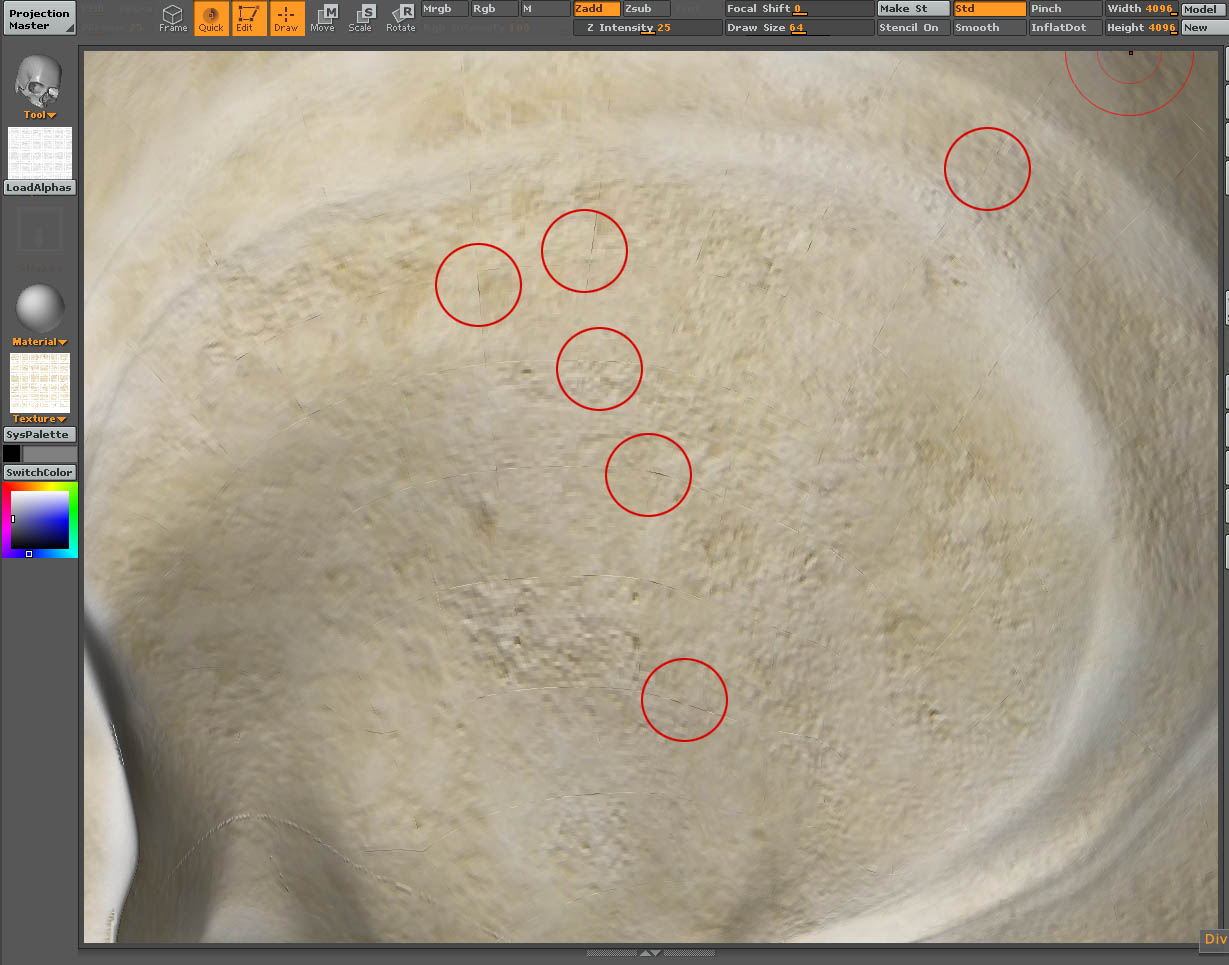
alpha_bump.jpg

What I would do is export the texture as a psd to photoshop, and then use the clone tool or something to blur the edges. Then reimport.

Yeah, I would do that, but I’m using AUVTiles, so blurring will just mess up the entire texture and I wouldn’t know which were the most affected edges which should be blurred anyway. The model is also far too complex to unwrap.

I’ve done some more testing on this, and it doesn’t matter how I generate the alpha map, be it from using just shades of grey with the bumpviewer material, or by using the texture to generate an alpha. Either way, I always get these problems when using Displacement Intensity to get my bump.

I’m wondering whether everyone else gets problems using an alpha for the displacement intensity when using AUVTiles?

Rather than using Photoshop to blur, try this:

After you’ve finished painting the map, press Tool>Texture>Fix Seams. NOW turn it into an alpha.

Fix Seams overpaints the edges of the texture by a certain number of pixels (the default is 4). This should resolve your problem.

Hi Aurick, yeah, I tried fixing the seams (even though there didn’t appear to be any) before converting it to an alpha, it doesn’t make any difference…

Try taking the original RGB texture into Photoshop and converting it to 16bit data, then to a greyscale image. Save this as an a separate file to be used as your alpha in Z-B. I havent tried it, but I reckon it cant hurt to try. The displacement function tends to highlight faults in textures that aren`t visible in the colour texture, but nevertheless were there all along! Making the alpha 16bit gives those flaws a chance to calm down a bit.

Cheers,

R

Cheers Rory, I gave that a go. Doesn’t make any difference though. All the same, thanks for the suggestion, it was a good idea.

Also, strangely, I exported as PSD and TIF, converted both to 16 bits per channel, changed their modes to Greyscale, and saved them out again. When I tried to import them into the alpha map, only the PSD would come in. I got an @Unable to read the specified file@ error when trying to import the TIF. I thought 16 bit TIFs were supported… Anyway, that’s besides the point, it’s the same affect I’m getting. Worries me this.

Cheers,

Sean

Oh blow! (replace with pithy expletive of choice) Shame that didn`t work!

Tiffs come in so many varieties, it`s not easy for apps to be able to read all of them.

R

Yeah, nuts (he says, in an effort to provide requested expletive). I even saved them out as 8 bit Tifs and it wouldn’t load that either. Seemed a little strange. Thanks anyway.