ZBrushCentral

Buff, help!. Normals from Zbrush to Maya

Well, i can’t carrying working a this level if finally i’m gonna get this poor results, let’s start:

Yes, I know that Zbrush is organic modeling oriented, but I’m really “rockcod”.

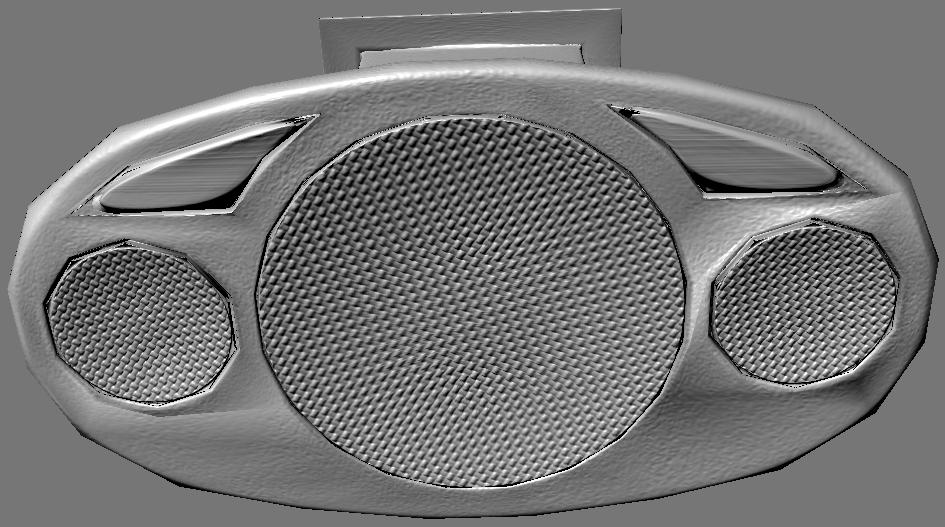
This is the Zbrush model:

[![Z1.JPG|908x574](upload://maovX0JvNEuNzUy5mhfamYxp4YM.jpeg)]![Z3.JPG|1093x634](upload://rkMR8Ip5Fc6Ty3S2TK3RAW5FkfI.jpeg)

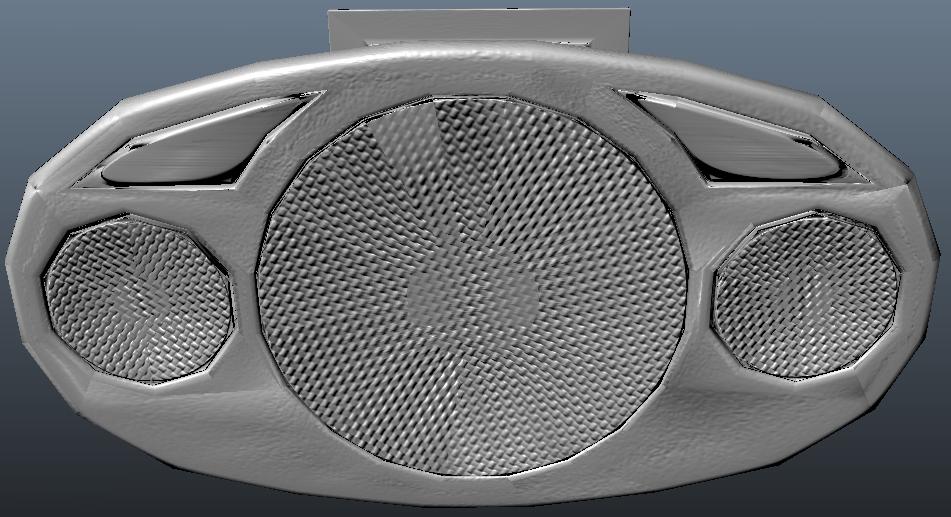
Oh, man, this last one is a bad cross between the first beauty and the batman’s joker!. This one is dumb cousing of the first!.

Sculpt, go to Zmapper, choose best tangent space for maya, create the map. Export it out of Zbrush, loads it in maya in the bump slot like a “Tangent Space Normal”.

I forgot some step away?.

Exist a way to fix it?

People, when I need add detail to a low model, I hate subdivide, if at least the original version remains really equal… For that reason I directly paint in a high texture with Projection Master with fade, but for this simple things, this little bumps, I’d like the Zmapper’s bump to normal mapping feature works. I’m sure this way would be deformless way…

Why we want up to 30 millions of polygons (Mdbx), when we cant store perfectly 6?

It will be possible fix this before 3.5 release? Pleaseee, c’mon, you’re really goods, please plis, plis… You can avoid things like this post… or this other: http://www.zbrushcentral.com/zbc/showthread.php?t=67246

Let me take it with humor at least… :(:confused:small_orange_diamond:angry:small_orange_diamond:D:laughing:small_orange_diamond:cry:

Attachments

Z2.JPG

It looks to me like the preset that was created for Maya doesn’t work anymore. This is not a surprise, since normal and displacement mapping settings have a way of changing from version to version as the apps come up with new ways to work with the technology.

You’re going to need to research to find out exactly what settings Maya needs. Or you’ll need to experiment with the settings in ZBrush to try and hit on the right combination. One place I’d recommend beginning is to look at your color flipping settings.

Ok. Desire me lucky!.

No lucky!. I don’t know what am I activating or not.

When you make presets, do you make it blindly?. Please, any direction?, Any information less poor than this:

http://www.zbrush.info/docs/index.p…Options_Summary

Any information about how Maya reads the normal maps?.

This should finish better than this:

http://www.zbrushcentral.com/zbc/showthread.php?t=37743&page=2&pp=15

Serious. This is not a game. I’m glad Zbrush give us this level of quality, but we need extract it out and use in other softwares, other render engines… I can understand that Autodesk is putting difficult things because they have buyed Mudbox to Skymatter, but a lot of us trust in pixologic. We have inverted many time in Zbrush learning, we have customer and deadlines, we need worry about do a great work at time and keep feed and paying bills. This is not a game.

Pixologic, can support us?. How did you say to a customer that try 32**32 possibilities? (1.46150164 × 1048).

Software that function as a plug-in, usually updates (in your case, free new presets) for most common great 3d software packages. What’s happening here?.

I can’t waste more time finding the golden combination, nor waste more time making perfect works for a result that I can’t sell because it give me shame.

This is not an issue about “this tool is overriding” or “it would be cool have this or that tool”, we need you fix our final step (extract all our work), or every work done will have been wasted. We need you now.

I’ve been researching a little more:

The best is, you make your original obj in your 3d package software, then import it to Zbrush and Sculp it.

Now go to Zmapper, go to the second tab and capture the mesh.

Next, reimport your original obj. DON’T subdivide it (not press “d”).

Make a 2K or 4K New Textrue

Go directly to Zmapper

Go to the second tab, up the searching distance if you think you need it and Project the detailed surface over the original low model.

You’ll got a map, that loaded in MAYA 2008, even extension 2 will appear like this:

[Maya2008Ext2.JPG]Maya2009.JPG

Both appear like here if you render it with Mental Ray, so, you’ll get it right in Maya 2008 Ext 2 and down, but you’ll get badly in Maya 2009.

We need a new configuration for Zmapper?. It’s a new maya 2009 bug?. It’s a fact.

What about this…?

Few people should need to actually get this far into normal mapping details, however. ZMapper comes with a large number of configuration files (see section #Configuration and Preview Controls) that will appropriately set all options for use with many other 3D programs. More configuration files will become available on the Pixologic website and in the ZBrushCentral forums in the future.

from here:

http://www.zbrush.info/docs/index.php/Expert_Pass_1_%26_2_Tab#Expert_Options_Summary

did you make sure that Maya Derivatives is check? if not do that and re-render. If yes then I have no idea what the problems is. I use 2009 at work and never ran into this issue.

[Maya.jpg](javascript:zb_insimg(‘166150’,‘Maya.jpg’,1,0))