I got zbrush at version 4 and recently got the 4.2 upgrade. I noticed that I have a much smaller number of brushes available and wondered if they were removed or if something was buggy with my version/install? I can see adding brushes but removing them, especially that many (missing 58 brushes) seems strange. Thanks.
All the brushes are still there. It’s just that some have been moved out of the default Brush palette to make room for the newer entries.
If you open LightBox and click the Brushes tab you’ll see all the many other brushes that ship with 4R2 – including the “missing” ones you remember from ZBrush 4.
If there’s a specific brush that you used a lot, you can simply copy it from the ZBrush 4R2\ZBrushes folder to the ZBrush 4R2\ZStartup\Brushes folder. It will then be loaded every time ZBrush launches. Don’t do this for more than 25 items, however.
This has been answered elsewhere; the “extra” brushes are found via lightbox under the brushes tab where there are several folders containing various brushes. You just need to double click on the brush you want for it to load into the brush pallet. The brushes will remain in the Brush pallet until you restart ZBrush.
Also read this: http://www.zbrushcentral.com/showthread.php?162050-Load-ALL-brushes-on-startup-Answered&highlight=brushes+startup
EDIT: Aurick beat me to it!
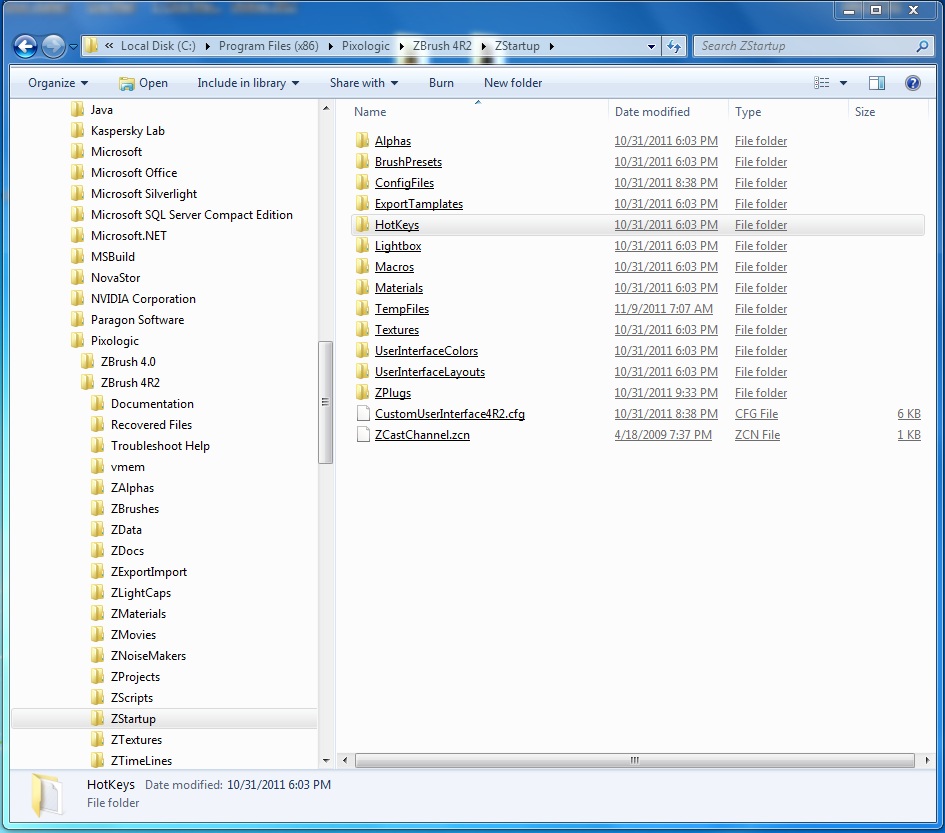
Since my HD took a dive, I can’t locate the ZBrush 4R2\ZStartup\Brushes folder, would it be OK to add it?. Have attached a picture.
Thanks
Wazer
Attachments