ZBrushCentral

Brush WrapMode not behaving as expected on imported geo

Hey all (first post :P)

I’m having issues using the brush “WrapMode” setting to create tiling geo.

If I start with a ZBrush Plane tool converted to a PolyMesh3D, then the wrap mode behaves as expected. When I import a simple plane from an OBJ (created in 3DS Max), the brush will not wrap around edge to edge. Instead, for a 1m plane, I have to keep painting about 1/3 the plane’s width past the edge before the brush wraps back around to the other side. For a 2m plane, the brush seems to wrap about 3/4 the way along the plane.

In both the above cases, the WrapMode slider is set to 1 and the UVs of the original plane in Max use the full 0-1 range.

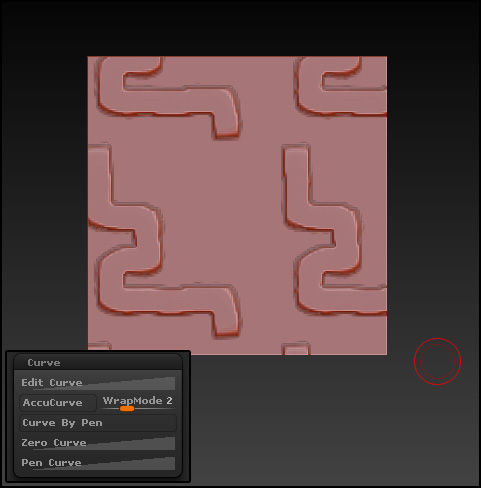
The below image shows the results with WrapMode set to 2 on a 1m plane imported from an obj.

I am attempting to create tiling textures using exported base geo from Max and this is the only thing that stops my workflow from being a smooth process.

Can somebody shed some light on what’s happening here?

Attachments
WrapMode.jpg

Maybe it’s something in your Max export settings. I just created a 1 poly plane in Hexagon and exported as .obj. Imported it into ZBrush, turned ‘Smt’ off and subdivided it 9 times. WrapMode worked as it should.

wrapmode.JPG

Ok. So apologies, but it seems that now I’ve re-tested, I was wrong about where the problem is:
Re-exporting the plane from max and then importing it into a new, empty zbrush document works. The WrapMode behaves as expected when I do that.

Instead, my problem lies when I try to append the plane as a subtool within my bricks tool (I would upload the tool, but it’s 55mb). Testing with a few more tools created in ZBrush, the plane seems to work fine. It’s just this specific tool (Murphy’s law says it’s the one I want to use the feature with :P).

I’ll do some more testing, anyway, and see if I can cause it to break again with a new tool.

Ok. New info that potentially sheds some light… It seems to be something to do with the “Groups Split” feature in the Subtools menu.

I have a plane that works alone. I re-export it with a cube in the same obj and then use “Groups Split” to separate the 2 into different subtools after I’ve imported into ZBrush. Now, WrapMode does not work.

I guess there’s something in the inner workings there that doesn’t like this approach. Testing with the simple example above, I can import a working plane as a new subtool of the split tool and it still works. With my bricks tool, I seem to have gotten into a situation that everything I import is broken as well. However, starting with the plane and then appending the bricks as a subtool (reversing the order), the plane can still be wrapped, so problem avoided I guess.