ZBrushCentral

brush strokes depend on the object orientation

Hi all!

I have a question concerning the behaviour of the brush in ZBrush.
On this picture I have a situation without mistakes. The model from 3dsmax is imported into ZB. If you draw with the brush on it,
the stroke is straight and clear.
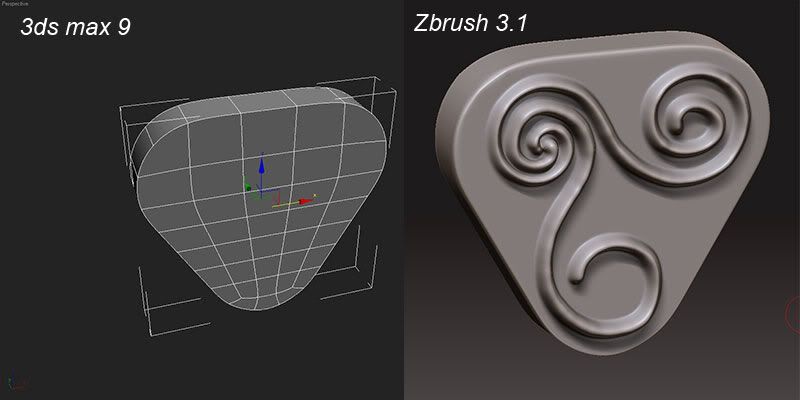
On the other picture is the problem itself. The object in 3dsmax is simply rotated 90 degrees.
After import into the ZB it becomes impossible to draw a nice clear stroke.
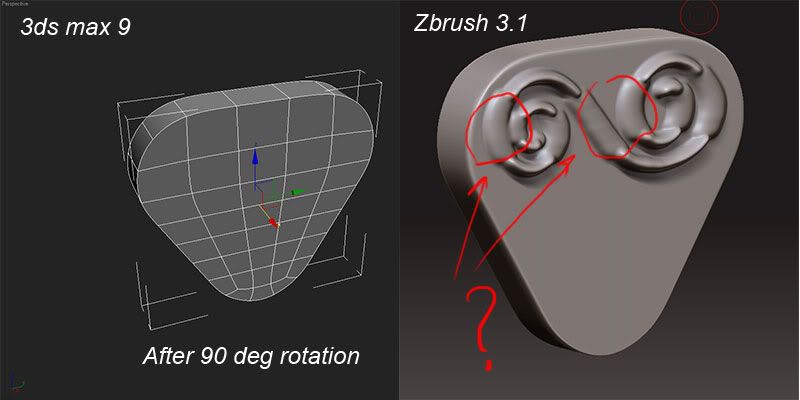
Does anyone know how to solve the problem? Thanks.

in max reset the xforms after the rotation

command panel>utilities>reset xform.

the SRT’s of the object that is rotated need to be reset/frozen. that should fix the problem.

it could also be something in your export options as well…but the xforms should fix the problem

Hope that helps.

Thanks fo reply, but reset xform didn’t help. Export options work great for most of objects. With imported flat objects i have weird brush strokes anyway.