ZBrushCentral

brush size increment hotkey not working

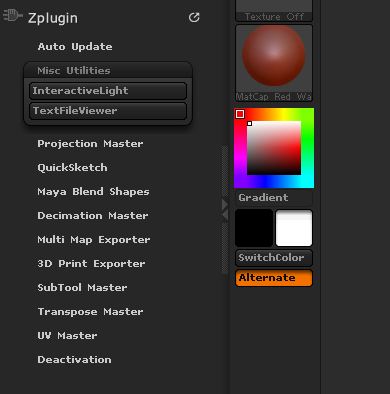
My zbrush4 R3 is with this strange behavior. Since I installed it the common brakets hotkeys (equal to photoshop) are not working. So my intuos 4 does not do anything when I use the wheel, it is really annoying. Im using “S” hotkey to adjust size but it is a pain in the ash… I have searched the web and forum and i found lots of things, even pixologic own support pointing to Zplugin>Misc Utilities> and there I was supposed to find Brush increment, but it is not there, does not exist… there is only “InteractiveLight” and “TextFileViewr” so I cant redefine the brackets as a hotkey.

I have not used an upgrade file to z4r3, instead I got the full instalation, maybe there is a difference, i dunno, just guessing here… anyone there with z4r3 could take a look if the brush increment is inside Zplugin>Misc Utilities> ?
See my post here.

Pro tip: At the top of the forum’s index page (where you see all the threads) there is a “Search this forum” button. You can use this to find immediate answers to most questions. In your case, it could have saved you four hours!

Thanks zber, really, but this did not help as the problem is the lack of those buttons.

Aurick, thank you, but as I said in the post I have searched the forums, the web and the online help, all answers are going the same route that zber kindly posted, but there is no button there to add a hotkey… any help would be much appreciated.

Please take a look at the image attached and as I was guessing, could it be that I uses the full z4r3 installation instead of the upgrade? Coincidentaly at the time r3 came out I had bought a new computer as the old one burned out on a lighting storm (bad luck I know) so I downloaded the r3 installation instead of installing the 4r2b first. Aurick can you check with anyone at pixologic if the button missing is an anomaly from the installation i got or every r3 standalone installer came out this way?

zbrush_misc_utilities.JPG

You obviously did not download and install the plugin that I had in that post or you installed it incorrectly. That plugin contains the Draw Size buttons as well as the Increment slider. I would suggest that you try it again.

Damn, i did not read the first part and went right to the image… sorry for that, and thanks for clarifying!

Have any clue why isn´t the buttons there in the first place? Thanks a lot, and dont know why this post did not apear in my searches, i even searched for the very title, that i found in google and it pointed to z4r2 thread with same title… did not work for me then. Thanks again.