ZBrushCentral

Brand New & texture question

Hey everyone, brand new here. Ive spent the last few weeks pouring through articles and watching tutorials and there isnt really much i cant find on my own. Man, love zbrush!

Anyways, im having problems understanding textures. Or more so, how to apply a texture just to one piece of the model, say like the eyes. Im also having a real hard time understanding projection master. All i can find are these old tutorials from zbrush 1.5 and 2.0 on you tube and whatnot.

I would think this should be something pretty simple. I mask off all but the eye, apply eye texture. But its nothing like that, texture gets applied to the entire model. (Im only working with a single mesh)

If anyone could quickly explain a step by step way to apply a texture just to one part of the model i would greatly appreciate it. Also links to any zbrush 3.1 articles/video tutorials discussing textures, and PROJECTION MASTER would also be a great help.

Thanks a bunches!!!
If you have one mesh but want to apply textures to certain parts of it, there are a few ways to get it done. We’ll use your example of wanting to paint just the eye on a mesh.

There are …many ways of doing this I’ll cover a few here.

A. Projection master method.

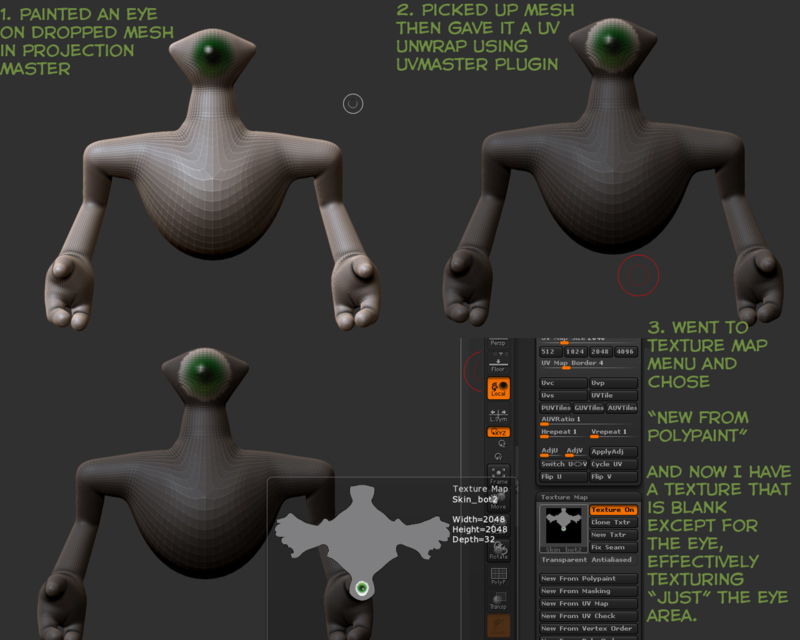
  1. Drop your mesh using projection master, no need for uv map or anything, just drop it if zbrush has a problem with that it will let you know and give you the option to enable polypainting just accept that.
  2. Paint the eye in manually, texturing with whatever you’re comfortable with, I painted my example by hand.
  3. When you’re done, pick up the mesh by hitting projection master again or hitting G on your keyboard.
  4. Go to Zplugin menu, choose UVMaster (install it if you don’t have it) and hit Unwrap. You need to be at your lowest subd level to do this.
  5. Once unwrapped you’re clear to head to the Texture Map palette and choose “New from Polypaint”. This will grab the polypaint you applied in projection master and bake it to your Uv Map and give you a texture that you can export all in one.

Here’s a shot of that (pictures speak louder than words and all that, so many words seemingly complicate a very simple process.)

[texture-tutorial-1.jpg](javascript:zb_insimg(‘189326’,‘zbrush-texture-tutorial-3.5.jpg’,1,0))
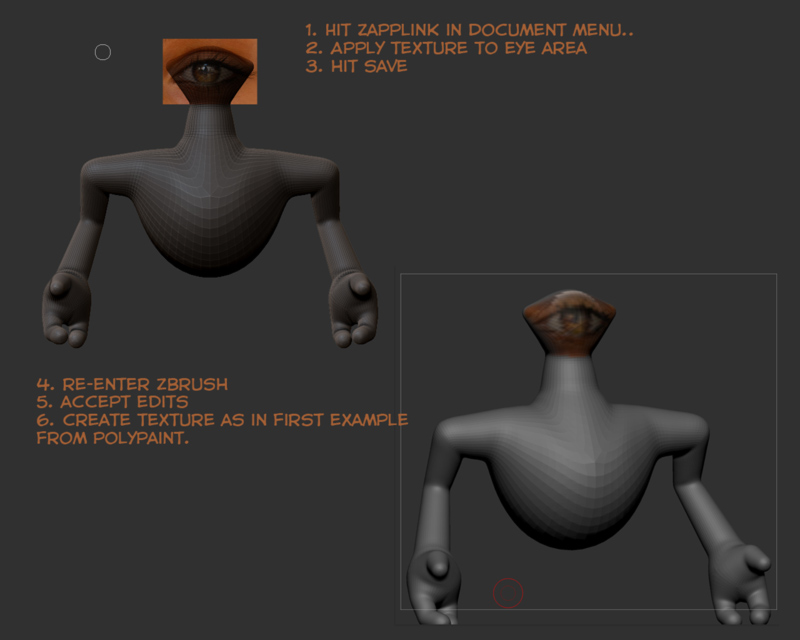
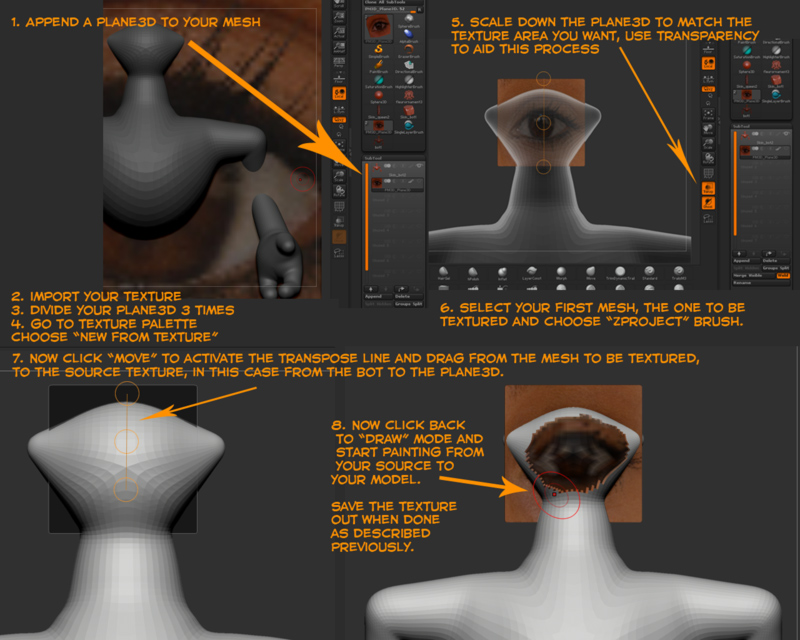
Now you are armed with 3 powerful methods of texturing, have a good time with that, hopefully it’s clear now.

Attachments

texture-tutorial-2.jpg

zbrush-texture-tutorial-3.5.jpg

oh. wow, what a reply to a post! Thank you so much. This is so help full, i applaud you for the amount of effort and time you put into explaining this for me and anyone else that has this like minded question.

A response like this makes me wonder if you had similar problems and questions yourself when learning haha. Thanks a bunch!

I would like to thank you as well! Your reply was Extra Dimensional!