ZBrushCentral

BPR size output

Having an issue regarding the BPR output size.

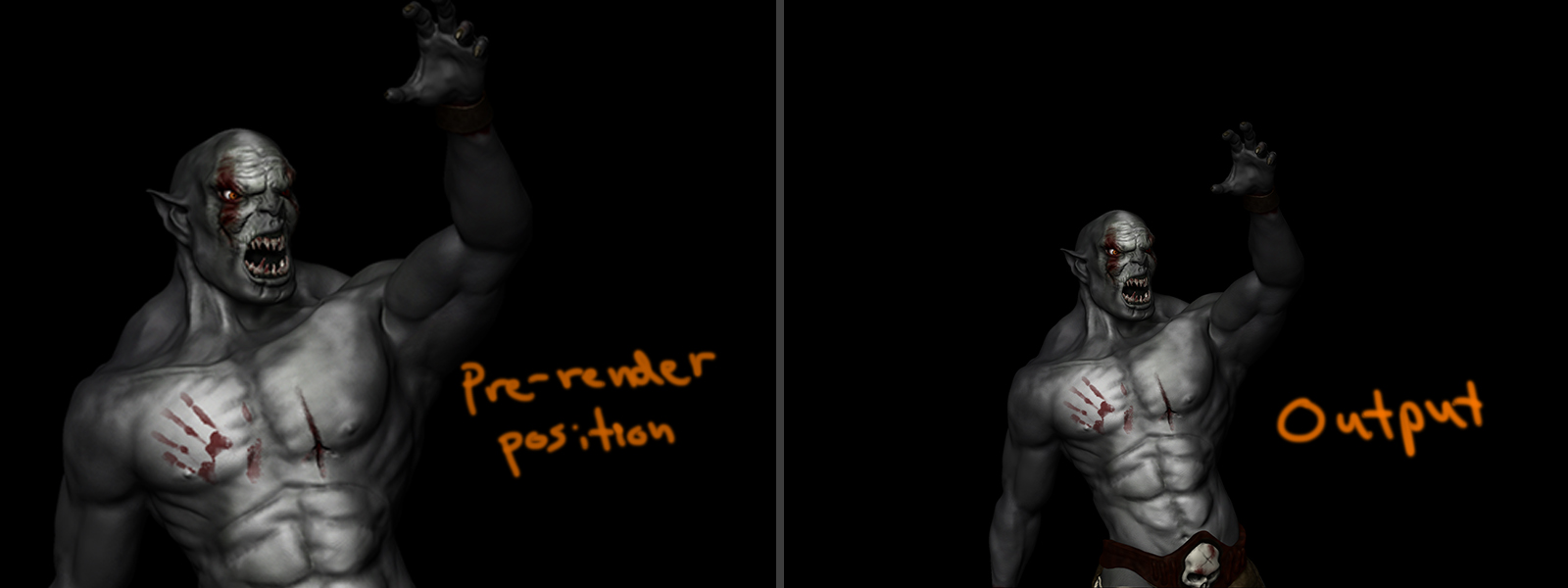
As you can see below, the left picture shows what I see on canvas before I render the image, and the right one showing the output.

Is there a way to see the real output size or am I doing something wrong? I tried looking for solution around the settings and forums but no luck so far.

Attachments
preview-output.jpg

I guess this perhaps could be the problem: The display that you can see in Zbrush no necessarily correspond to the render area or canvas area because it can be hidden by menus etc. The exact size of the canvas is indicated in the document section. If you use the “new document” button in the same section the canvas will be changed to what you actually can see. This means that any render will correspond exactly with what you can see as the canvas won’t continue under the menus. If you hide menus with tap for example you will see a different color for outside of the canvas area.
There is another option, that you are using the AAhalf option of the document section that will double the number of pixels. If you don’t zoom in to get slow anti-aliasing (the function of aahalf) then a large section of the canvas will be out of view. This can be solved with the same system than above that will crop any non seem pixel.

See number 12 http://docs.pixologic.com/reference-guide/interface-overview/
I also made some scripts to set canvas size and background color.

If the Document size exceeds what can be shown in the document window then part of it will be cropped. To see the whole document you can click and drag on the Zoom button on the right of the interface. If you have zoomed out to see the whole document then this won’t affect the render size. Simply press Document>Export to export the render when it is done.

The AAHalf button that Altea mentions is not necessary when using BPR. This is a legacy feature used to improve a render by reducing the size and improving the smoothing of edges (‘anti-aliasing’). If you press the AAHalf button then the image size will be smaller - half the document size set in the Document palette.