ZBrushCentral

Blocky diffuse problem!

Hello everyone, i seemed to have bumped into a little problem. My character has 6 sub divisons and i’ve unwrapped him in max and exported the new low base mesh back in with no problems. However whenever i click ‘New from Polypaint’ the texture has some ‘issues’ i’ve looked carefully and it seems that the polygons have some how ‘baked’ onto the texture. I’ve even exported the second sub div which and unwrapped that. Imported it fine and had blocky problems but more errors on the texture map. Can anyone help me?!!

Would like some help with this problem of mine. It is a university assignment and as so, i am required to polypaint and export the diffuse and normal maps from zbrush.

Thanks in advance.

Attachments
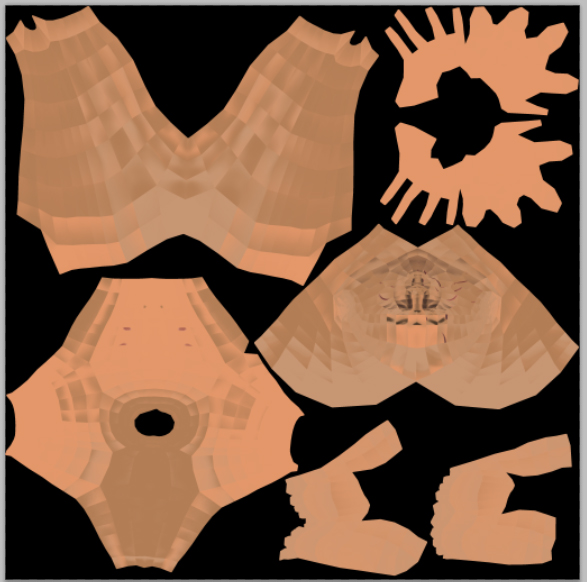
texture problem.jpg

i think the uv´s are the problem

if you take a closer look on the texture that you posted, you may notice that the “faces” would yield the correct result if they were flipped.
the “gradients” of the individual “faces” seem to face the wrong way.

at least that´s what i am seeing

i would recommend checking the uv´s in max once again - i´d like to see a screenshot of the subdivision 1 mesh exported from zbrush compared with the mesh you unwrapped in max, both with a colored checker texture applied to it, side by side

Ahhh yes! I do see where your coming from. Hmmph strangly, the uvs break up so they are in their original position but become ‘un-stitched’ . The left is the max unwrap and the right, a fresh export from zbrush. The meshes themselves are both identical as i haven’t modified them in any way.

comparison shot.jpg

Thanks again for the help and quick reply.

so were you able to fix it?

there would be several ways:

  • export the left meshes uv´s using max´ save uv feature
  • still inside max load them to the zbrush mesh (right mesh)
  • export this mesh (doublecheck if uv´s are ok!) as obj
  • reimport to zbrush
  • hit the texture > uv´s to texture button to check the uv´s inside zbrush (you will see if the face/gradient-problem turns up again)
  • if everything is ok switch to highest subd level
  • create textures

or

Nope problem wasn’t solved but i’ll have a crack at the first solution and will report back.

Something else you can check in ZBrush…

Go to Tool > Texture Map and click ‘New From UV Check’. If you see any red in the resulting texture then ZBrush doesn’t like your UV Map. Usually the reason that ZBrush doesn’t like the UV map is that some of the islands might be touching the edges of the UV space in which case you would have to move them in a bit.

Yeesssss!!! Thanks a lot! It seems that it went screwy when i exported the new uv mesh from max into zbrush. I had the zbrush option ticked in max. When i unticked it and exported it using ‘NONE’ it went into zbrush fine and i don’t have any screwy faces.
Byron_Unwrapped_65.jpg

Mucho thanks again!

:+1: