ZBrushCentral

Bikini on top

Right, well i don’t speak English that well so please bare with me.
Here’s my problem.
i modeled a bikini for my female model. it’s a sub model
(c attachment)
As you can see the bikini penetrates in to the body.
How could i repair this,
i thought there was a tool for this. that puts the geometry outside the other until a even hight
Or do i have to use the move tool with every CV and do it manually

i hope you understand what i am saying
sorry again for my English
thanks in advance

Attachments
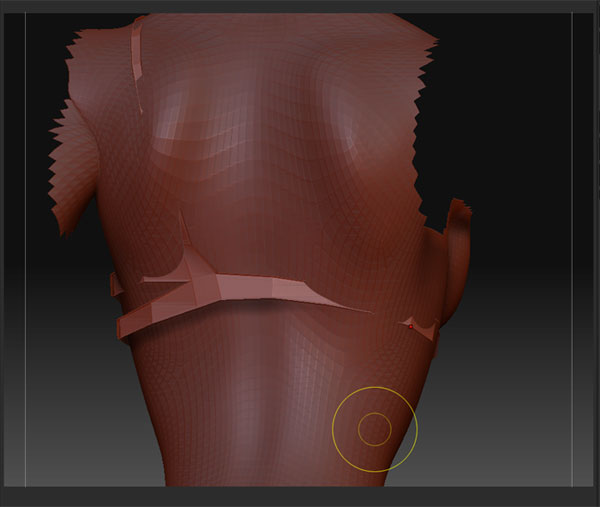
Bikini.jpg

not sure what a CV is. but yes, you have to manually more all of the points outside of the body. You can also try to use deformers on the bikini top…but I think it would be easier to just use the move brush.

Wow thanks for the fast reply.
I already solved it a bit, meaning i went back to Maya and used the sculpt geometry tool which can pull point in our out equally.
(yeah sorry Maya guy here thats why i was talking about CV also known as points)

using the move tool would be doable with this bikini model but with a higher res it would be a pain in the butt.

anyway i thought there was a tool for that in Zbrush (pulling points out)
i thought i saw it somewhere in a tutorial but i can be wrong off course

So thanks for the reply and help
:+1:

I think you can do the same in zbrush using retopology. I really never did it but i know you can do it.

Nah sorry,its not what i mean.
This is a Reto model thats why it doesn’t fit anymore
(fast and dirty) :smiley:

it should be a brush or something,
cause yeah your right i rather stay in Zbrush while doing this

Thanks anyway for the input
appreciated :slight_smile:

So I would assume it’s a seperate subtool? If it is, then just use the move brush. You certainly don’t have to mess with individual points, even at a super high res. Come on, this is zbrush. It looks pretty simple as far as how much work you’ve put into it. Why not just redo it as a new subtool using mesh extraction? It would fit perfectly then, and take about, uh, 45 seconds. I wouldn’t worry so much about 15 polygons.

a CV is a Control Vertex, the term CV is mostly used on NURB geometry (surfaces / curves) - on polygon geometry it is normally called a vertex. Some would also say “point”, but I feel a point is on curves and not on polygons.
But all in all CV’s, Points and vertices - its just points that has to be dragged around :stuck_out_tongue:

Why don’t you use Inflate or Scale deformations? If you make a morph target first, you’ll be able to ‘erase’ back towards the original shape in places that need adjustment after the deformation.

Cheers,

R