Afternoon,
I’m having a slight issue. This hand is part of a full body mesh that i have started to sculpt. What has happened is, the fingers have been inflated (I assume i did this to make the hands a little larger) and now the “verts” are intersecting each other between the fingers. Firstly, i’ve tried the inflate brush again to try and create the opposite (deflate the hand) effect but it doesnt quite work.
I’m trying to figure out the best way to get some space between the fingers so i can continue to sculpt.
I’ve tried this; putting the hand to its own poly group and then hiding the rest of the mesh. Then i built a rig using zSpheres and separated the fingers to some success. Then i couldn’t Ctrl-Shift-Click out of the mesh and find the rest of my sculpt.
I’ve also tried to mask the individual fingers and then use the move brush to tweak the verts away from each other but that doesn’t really seem to work for me either.
Do i have to create a complete zSphere rig on the entire mesh just to separate these fingers? If i do this, can i continue to sculpt the mesh? The mesh was created in maya, so i want to be able to continue sub dividing it and adding detail.
I apologise for not really knowing what I’m talking about. I’m very new to zBrush. I have heard that this community is very welcoming to the new zBrush users.
I look forward to your help.
Josh.
Attachments
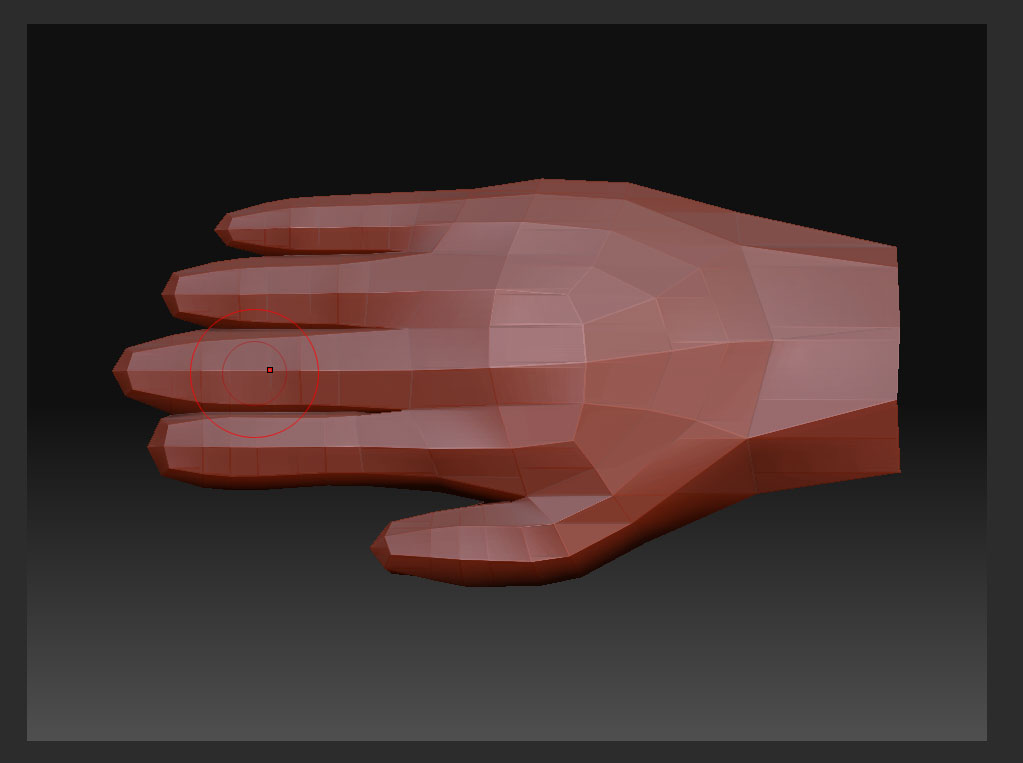
 Is to make each finger into its own polygroup. Then simply use the rotate transpose line. You can also use topological masking if you don’t want to make different polygroups.