ZBrushCentral

Best way to do this ?

Hi folks.

I’m tryin’ to figure out the best way to achieve something like this (well, not exactly this… but pretty similar) :

I was thinking about starting with a cylinder and cut lots of holes in it and then refine everything the way I want it… but now, I wonder what’s the best way to rapidly cut holes in a mesh.

… or maybe you guys have an even better idea ?

Thanks for the help.

J.

Attachments
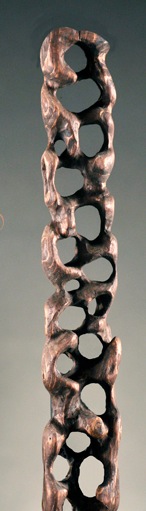
Screen Shot 2013-10-29 at 10.37.38 PM.jpg

Groups loops then hide and delete hidden (or just leave hidden). http://www.zbrushcentral.com/showthread.php?180719-ZScript-problem-for-Marcus-and-anyone-else-who-likes-ZScripts&p=1044561&viewfull=1#post1044561

  1. You could dynamesh the holes out with negative insertions, hole by hole.

  2. Or in the case of this organic, irregularly shaped object, create it as an extract from another mesh by mask painting it, holes and all, onto another mesh and performing an extraction.

http://docs.pixologic.com/user-guide/3d-modeling/modeling-basics/creating-meshes/mesh-extract/

  1. Or use Shadowbox.

http://docs.pixologic.com/user-guide/3d-modeling/modeling-basics/creating-meshes/shadowbox/

Yeah, extract might do it but you have to somehow mask the area you want. I think there’s an ExtracT.txt in those scripts.

It’s a pretty rough organic shape, so I imagine you could just hand paint the mask by hand along the side of a roughly cylindrical form. There would obviously be some sculpting involved after the fact, but that is true with any of these approaches. It’s not exactly a machine-perfect shape.

Shadowbox would probably be the easiest, getting you closest to the intended form from the start.

Dynamesh would be the most time consuming, but ti would give you the most control and allow you to cut shapes out of a form that has already been sculpted as desired, requiring only some touch up after the fact.

Been playing with a script file. Save file to Startup/Macros/Misc. Not too well commented, some of it is self explanatory. Start with Cylinder3D, go into initialize panel, set inner radius and divisions until happy and then hit make polymesh 3D. Subdivide a couple times and delete lower levels. Go into edit menu and delete undo history. In subtools, duplicate a couple times. Run the script. Have fun.

Yup, that’s what I’ve been tryin’ to do while I was waiting for answers… works pretty well. Of course, it does need some scuplting afterward, but I really don’t mind the sculpting part…to me, that’s the fun part. :slight_smile:

Thanks for all the suggestions everyone… I’ll probably end up trying some other ways of doin’ it… and I’m still open for suggestions.

I would start with a shadowbox and get most of the general shape that way. Then switch it to a dynamesh and finish it up.

i personally recommand shadow box:cool: