Best Preview Render Problems - MAC
Thanks!
Mac Pro 5,1; 3.2 quad; ATI Radeon HD 5870 card; 3GbRAM
Attachments
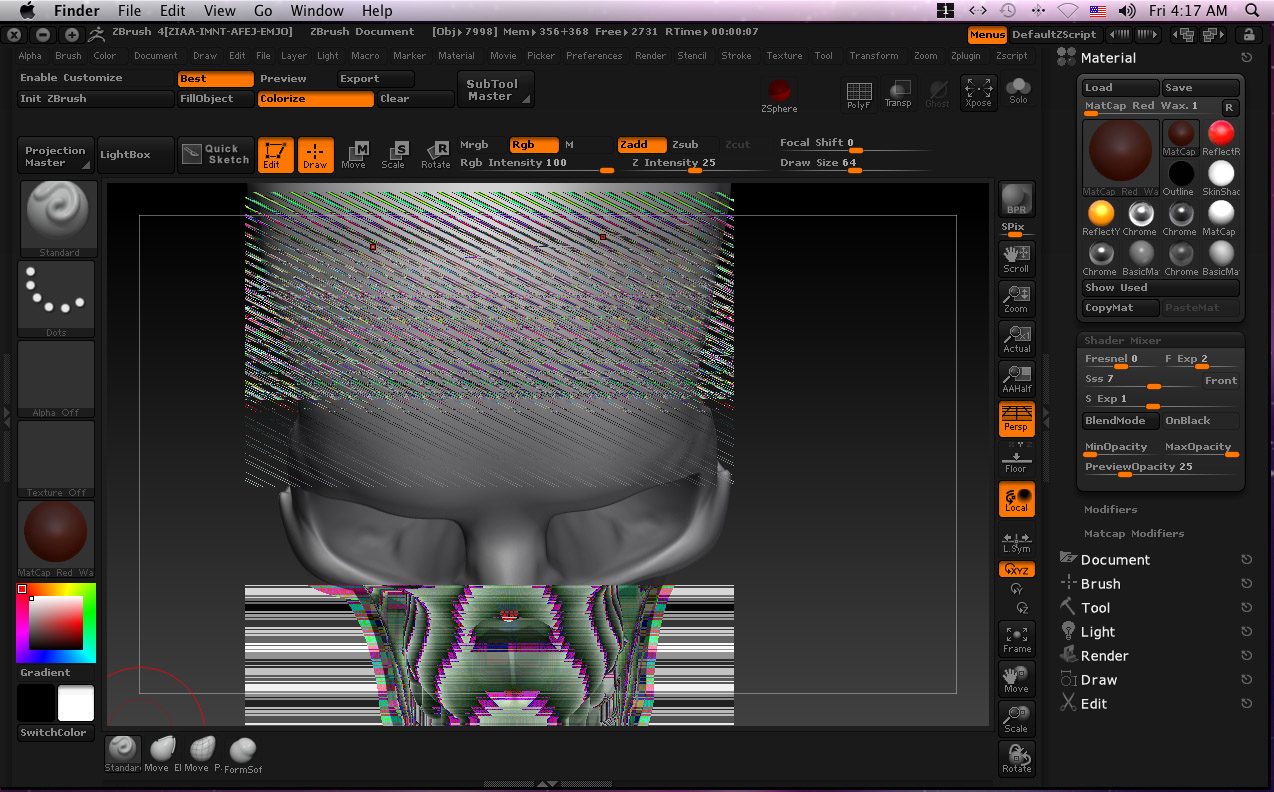
Best Preview Render Problems - MAC
Thanks!
Mac Pro 5,1; 3.2 quad; ATI Radeon HD 5870 card; 3GbRAM
It looks like it’s definately a video card driver issue. Do you have the latest drivers installed for your video card?
Also, if you have the Render>Create Maps option on, are the maps effected?
Thank you for your help guys.
Zber 2, I went to AMD website and unfortunately they have very little support for Mac OS. There’s any driver update for the hd5870 for mac.
Marcus, I ran a test with the Render, create maps on and yes, the maps are affected, although the shadow map seems OK:

I’m going to make more tests to see if there’s any patterns to avoid this problem, for example, if after a bad rendering I click “Best”, then “Preview”, then “BPR”, most of the time I got a good render, but it doesn’t work all the time.
Hello Brisenor
Have you ever changed your document size during this session? If you did what size did you change it too?
Paul
Hi Gabo1991, no I haven’t changed the document size. As soon as I get home later tonight I’ll try that.
Thanks!
Hi Paul,
I did some BPR renderings at double the document size (1772x1094), played with the SSD, lights, and other rendering settings and wasn’t able to recreate the ghost images. Then I initialized ZB, load the same tool I’ve working with and in the third BPR rendering the ghost problems started again. So definitely you’re in the right track, the problem seems to be related to the document size. I’ll be working with different document sizes and will post if something comes along. Thanks so much for your help. The people in this forum are great.
ˆencountered this problem also. I found that it only occurs at certain resolutions. 720x486 makes BPR renders go nuts for some reason. It isn’t a vid card problem because ZB doesn’t use your vid card. I made a post about it 2 weeks ago and got 0 responses. Tech support also had no answers. This is 1 of 2 major rendering problems in ZB 3.2 and 4 that tech support hasnt been able to give me an answer on.
Hi Mr-NYM, thanks for the info. I wish I’d seen your Wierd Pixels in renders thread before installing ZB4 in my MacPro. I haven’t had any of the wierd white pixels in renders so far. You mentioned that it might have to do with lights so I’ll pay attention.
I think this is to do with the buffer size that ZBrush is using for calculating things like Shadows and how it relates to document size. For example, for a document of 720x486, setting the Render>BPR Shadow>Res slider to 720 got rid of the problem.
When testing be sure to click on the canvas background between renders to force a refresh.