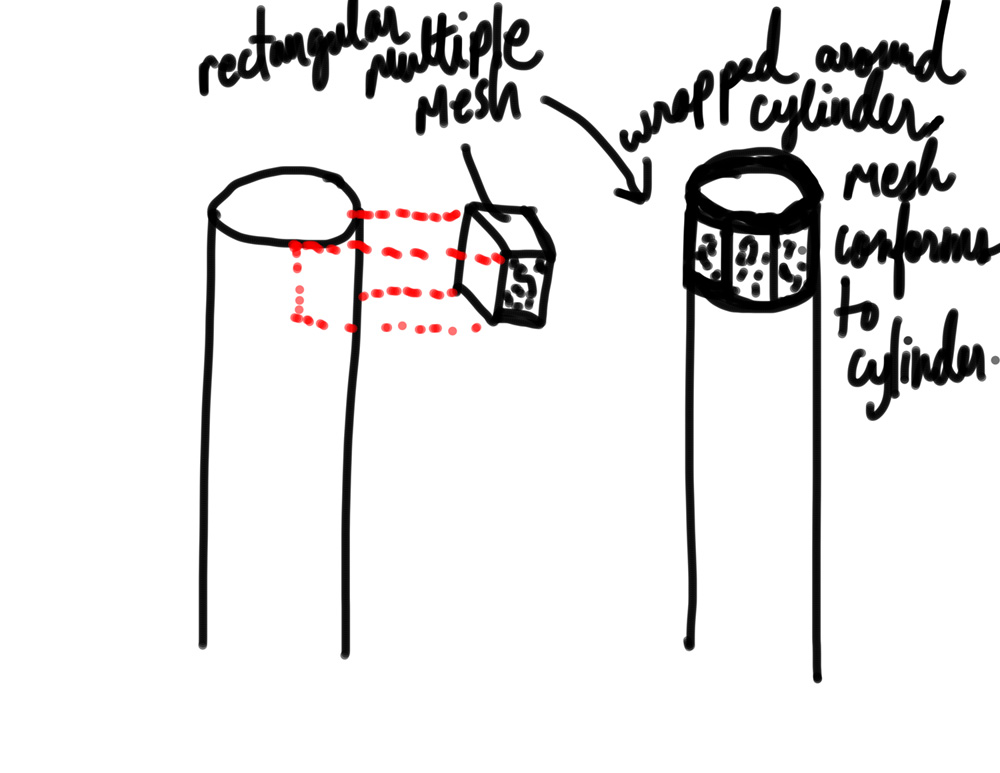
Hi,
I was wondering if you could tell me the best way to achieve this. Basically, I have a rectangular ornament that I need wrapped around a cylinder. It will take multiple copies of the rectangular mesh to wrap all around the cylinder. The requirements are that the rectangular mesh CONFORM/Bend to the surface/shapre of the cylinder so the pieces look round and not facated. Also, I’d like the rectangular mesh to sit flush and aligned along the top edge of the cylinder.
I was playing around with the InsertMesh with curve option but I’m not getting the mesh to sit flush and it isn’t conforming to the surface of the cylinder.
Would ‘Projection Master’ allow me to do what I want? or is it better with the InsertMesh brushes or another method? Any suggestions and settings that would bring me closer to what I’m trying to achieve would be appreciated 
Attachments