ZBrushCentral

Bad Quality CavityMap images- !?!

Hi guys-!!

I was trying to create a Cavity Map from a model that I have sculpted, it works… but it always looks pixelated or low quality, almost like it is not anialised if you know whaT I meen, how do I get ZB to make a high quality one that looks smooth!?

Thanks guts I am stuck :wink:

oh!!

still no one knows this one ha!!

if you don’t understand my quastion I could post image samples…

thank’s everyone…

Are you use ZMapper? And what size are your maps - that will have an effect.

Hi Marcus,
thanks for the reply!!
yes Zmapper…

how do you control the size!? I usully Just click into Zmapper, then it creats cavity… then I exit it by clicking on Zmapper again… is there another way!?

thanks brother…

Create a new texture of the size you want before entering ZMapper.

got it :wink:
but still the baked result from the Cavity mapper… looks rough!? I meen the edges look a bit like stairs if you know what I meen…!!

is there a wai to sofen that up…?

thank you …

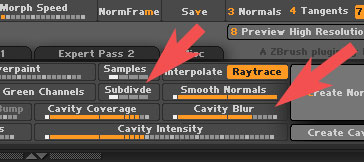
You can try a couple of things: Increase the blur in the ZMapper cavity map options and/ or increase the Subdivde slider. You’ll need to adjust the other sliders to get the effect you’re after.

Cblur.jpg

on it :slight_smile:
sorry for the truble… and big thanks to you for your clear and fast support… :slight_smile:

You’re welcome. :slight_smile: