I’d like to always start without the gradient in the background.
The only way for me is to start AND then go to Document and eliminate the gradient.
But each time I restart The gradient is back …
Any help ? Thank you
I’d like to always start without the gradient in the background.
The only way for me is to start AND then go to Document and eliminate the gradient.
But each time I restart The gradient is back …
Any help ? Thank you
I have a macro set up to make all of the changes that I change everytime I start up Zbrush. Movie settings, document size, background, etc.
I believe you can also save the doc and overwrite the start up to change the gradient as well.
Is the macro loading itself when ZBrush starts ?
I did this by setting up the gradient (in your case off), then going to document > Save As Startup Document. The gradient is saved with the document and it loads fine everytime I startup ZB4.
Documents are saved within Projects though, so loading a Project that has a Document with different gradient settings will change the current gradient.
Hope this helps 
Original post by M i c h e l
“Is the macro loading itself when ZBrush starts ?”
Check out this post by marcus_civis on Setting up a macro to run on startup
Thanks to all of you guys !
It works perfectly well now. This community is so confortable !
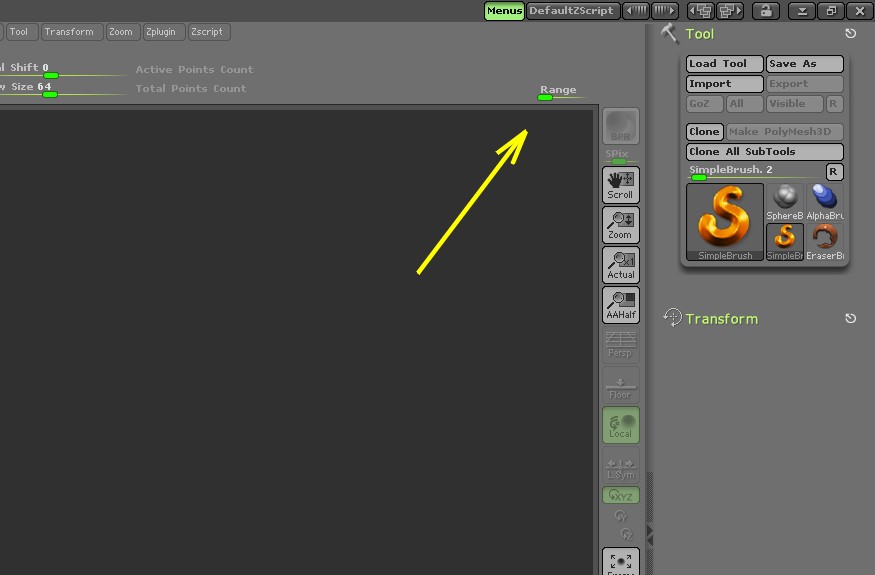
If you did “Save As Startup Doc” like PolyTweak suggested then keep in mind that if you “Initialize ZBrush” then the gradient will be back. There is no way of avoiding this. Just as a suggestion, you can also do what I did and move the “Range” slider to a convenient place using Custom UI where you can easily set it back to 0.
Zber2 that’s a handy idea!