ZBrushCentral

Automasking: Mask by Polygroups 100 results difference between Zbrush4 and 4R...

Hi everyone.
I am new to Zbrush.
Recently I encountered this problem, and it keeps bugging me. In Zbrush 4 Automasking set to 100percent affects only one of a polygroups (logical - so explains it Zbrush documentation) However, in 4R (not sure if in all versions) 6, same action affects next polygroup as well. (4R6documentation however says same thing as zb4 one.)
I am pretty sure I just have to uncheck or check something inside totally different pallet, but dont know what.
Would be really gratefull for help. Not, that I use it so much, just but I became obsessed with it and cant sleep.
Thanls a lot.

From 4R6 documentation.
The Mask By Polygroups will apply a virtual masking based upon the polygroups of the tool. If you have the setting at 100 then the first selected polygroup will be the only part of the mesh that can be edited by selected brush. If you have the slider any lower then that will allow multiple polygroups to be edited on a given stroke but with less intensity then the first selected polygroup.

Attachments
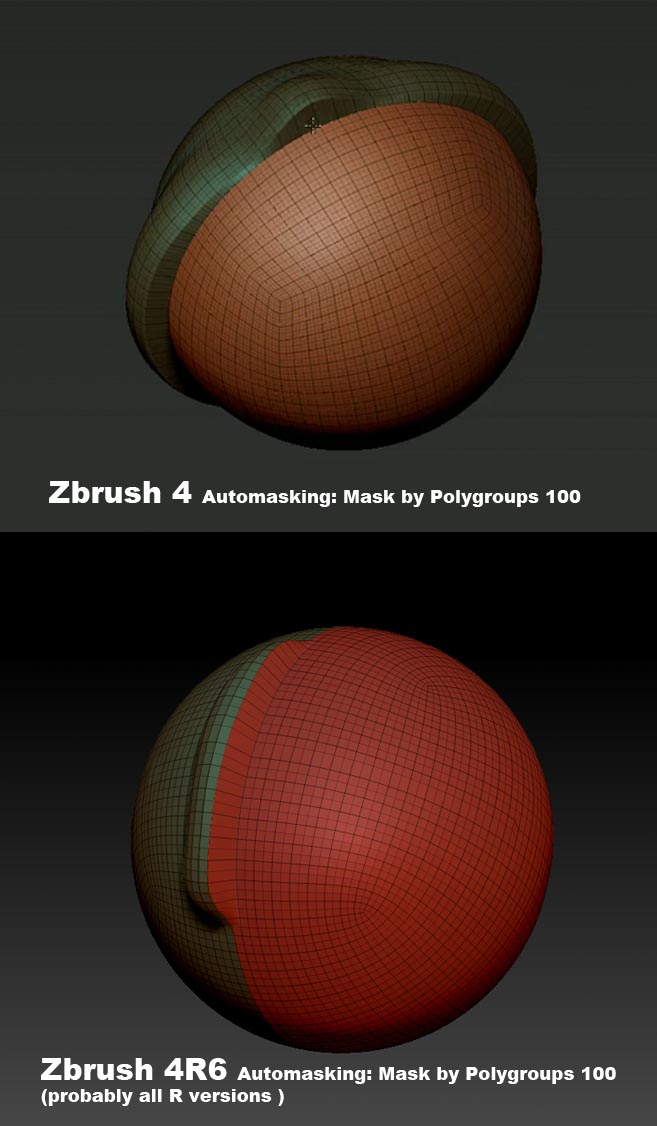
trouble.jpg

I agree that the ‘Mask By Polygroups’ slider at 100 isn’t doing what it’s supposed to be doing. It shouldn’t be affecting the other polygroup and it is, and I don’t think that there is anything elsewhere in ZBrush that will change this. Maybe somebody from Pixologic can clarify this to be a bug or not.

As an alternate solution, you can use manual masking. Hide the polygroup that you want to affect with sculpting by ‘Ctrl+Shift+clicking’ on the polygroup you don’t want affected with sculpting. Then completely mask the part that is visible by ‘Ctrl+draging’ a rectangle mask over it. Unhide the polygroup you want to sculpt by ‘Ctrl+Shift+clicking’ on the canvas and do your sculpting. The masked polygroup will not be affected.

Apparently working around the problem is the only option for the time being.
Hope they will fix it at some point.
Thank You for replying.

I thought this felt different!

I hope Pixologic is aware of this bug.