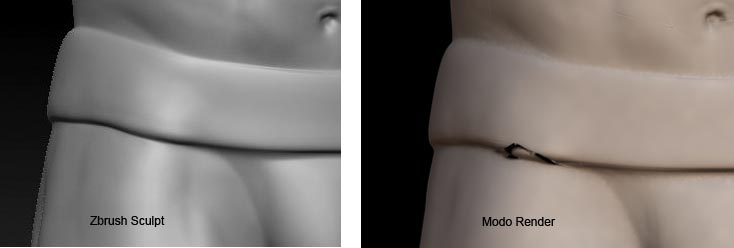
I getting some errors that are being generated when I export my displacement maps.
As you can see from the image the sculpt looks fine in Zbrush but there are small areas of white appearing on parts of the map when it is generated which result in displacement errors when I render in Modo.
On investigation I can see areas of white on the map that correspond to the render errors so I surmise that something is happening when the map is being generated.
UV’s are good (no overlapping etc) and I have tried it out on a GUV and conventional unwrapped UV but the errors remain in each case.
The errors dont necessarily appear on a seam either so I’ve eliminated that.
Any ideas as to what might be causing these white artifacts to get built into the map when its generated?
Attachments