ZBrushCentral

Are there bugs in the Displacement pallet and can one object have more than one UVmap

Hi everyone!
Hya ZBer!!!

A bunch of people and I have been messing with displacement maps and UV’s and there are supposedly bugs in the Displacement pallet, I don’t know how its supposed to work so I don’t understand what the bugs are or if they are indeed bugs (following an unlikely workflow fixes a lot of problems though).
Apparently you should (and this makes sense to me) be able to apply your displacement map right on the object you are working on and mess around with it without exporting and importing the object itself as a .obj file, this seems to not be the case… I don’t know if that is a problem or not seeing as that is how it works at the moment and I have never seen different. It also seems to work differently between operating systems but I can’t demonstrate that as I haven’t got the other OS (Macintosh) and there is a rather sharp language barrier with the person who does.

The other thing that seems odd is he can’t use multiple UV maps on a single object and yet I can with not problem. I can also do things like preview them while I change them and I can change UV mappings any time i like (as long as the lowest subdivision is active). I can do this with the Texture pallet on or off, but obviously can’t see anything with it off, so I just leave it on.
Am I supposed to be able to do that? I have just done a single object with six different UV maps on it and it worked fine I can hide areas and apply displacement maps then switch to other areas and apply different one, and I can apply a different map to the same place if I want with or without changing its UV mapping. Now that i have said that I realize that this is a VERY flexible set of tools! Is this how things like this normally work or is it totally different elsewhere?

I have no idea what this stuff is doing or why but it is very interesting to play with, the problem is that every time Im told something is impossible it turns out that its not only not impossible, its usually a great way of doing things! For example I was told to NEVER apply a displacement map more than once, I do that all the time and it works great. I was told you can’t do more than one displacement map and I do that too, and not only on the same object but on isolated parts of the object if I want.
I realize that my experience with this stuff is limited to ZBrush so my understanding of it might be skewed.
So…
I dont understand my questions here to be honest, but I would like to.

Anyhow it’s all Greek to me!

Cheers (and THANKS)!
Mealea
The other thing that seems odd is he can’t use multiple UV maps on a single object and yet I can with not problem. I can also do things like preview them while I change them and I can change UV mappings any time i like (as long as the lowest subdivision is active). I can do this with the Texture pallet on or off, but obviously can’t see anything with it off, so I just leave it on.
Am I supposed to be able to do that? I have just done a single object with six different UV maps on it and it worked fine I can hide areas and apply displacement maps then switch to other areas and apply different one, and I can apply a different map to the same place if I want with or without changing its UV mapping. Now that i have said that I realize that this is a VERY flexible set of tools! Is this how things like this normally work or is it totally different elsewhere?

If I’m reading this right, then you can still only have one UV set and one texture/displacement map per subtool at a time. But there would be no limit to how many times you can apply the data to the actual vertices, meaning you can repeatedly change them around as you please while still accepting their effects how you please

As for displacements, I’ve never had to export and reimport a mesh just to be able to use them. Is this something they’re doing because they can’t see the displacement map subpallete (a longer way converting primitives and zspheres into polymeshes), or is there another specific error they’re running into?

|

The first part is confusing (actually the whole lot of it is) to me, I don’t seem to be limited by this at all, other people do, mainly a Macintosh user.
I can have one object (no subtools) with as many UV mappings as I care to apply to it, I can then apply displacement maps and they are affected differently by all of the different UV mappings, this is terrific in my opinion. The person on the Macintosh can’t do this. When part of the mesh is hidden he gets an error saying “Note: This function cannot be used while the mesh is partly hidden, unhide mesh points and try again” I can do this all I want and he cant (Im on a PC if that helps).

The second part is linked to HRepeat and VRepeat in the Displacement Pallet, in order to apply a displacement map at say five H and Five V you have to use Create And Export Map button and say yes when it asks if you want to save the base mesh, then you have to import that base mesh and apply it for it to have the Hrepeat and Vrepeat looking the way they should. If you apply your map normally (without the export and import step) it does it at one H and One V.

We have no problem seeing the Displacement Map SubPallet, but now Im curious about how you would convert Primitives and ZSpheres using this… hehehe I wanna know EVERYTHING!
What do you mean about that, is it like Adaptive Skin (or is that Unified?)?

Is that more clear?

Thanks Cryrid and Cheers!
Mealea|

Its a bit more clear.

In the case of UVs, you still only have one UV map. What those buttons are doing are creating subprojections (islands), as opposed to creating additional uv sets. So a basic cube would only ever have one set of UVs, with 1-6 UV islands depending on how you choose to lay it out. In zbrush, it wouldn’t be able to have 2 or more UV sets where it could be laid out simultaneously as a cross and 6 separate squares as it could in other programs.

With that confusion out of the way, the real question is whether or not the Mac version allows UVs to be edited when part of the mesh is hidden.

The second part is linked to HRepeat and VRepeat in the Displacement Pallet, in order to apply a displacement map at say five H and Five V you have to use Create And Export Map button and say yes when it asks if you want to save the base mesh, then you have to import that base mesh and apply it for it to have the Hrepeat and Vrepeat looking the way they should. If you apply your map normally (without the export and import step) it does it at one H and One V.

The repeat options in the UV Map subpalette? AFAIK those don’t actually change the UVs (as evident by using the uv morph). The likely reason for this is so that you can continue to adjust the number or drop it back down to the original value. By exporting the mesh you force it to baking those adjustments into the actual UVs (which can again be seen by UV morphing). I’m not sure if they’re meant to work with displacements as they do with color textures, or if there is a limitation that requires them to use the actual UVs. If that was the case then your options would be to either bake the uv offsets into the mesh itself (export), or set them back down to 1 and tile the image itself respectively.

but now Im curious about how you would convert Primitives and ZSpheres using this… hehehe I wanna know EVERYTHING! What do you mean about that, is it like Adaptive Skin (or is that Unified?)?

Just by exporting the mesh. Since it exports to a polymesh (obj), it gets converted to one.

|

Hmm… so…
This is hard to comprehend let alone say…
When I use six different UV mappings on one object they actually all one UV map, just with different islands in it?
So this means that each UV island can be its own UV type, like on a complex object with flat areas I could use UVP and on tubular areas (like a hose or something) I could use UVC?
That would be cool!
Im still confused but I think its getting clearer… maybe…

I understand the last bit about exporting, that is actually obvious now that you have said it!

The UV Morph thing is a bit over my head, Im going to need to look at it a bit I think.

Im getting the impression that ZBrush deals with UV’s radically differently from other programs and that someone only knowing about them from the ZBrush end of things might have some trouble understanding what other people are talking about.
Im starting to think that there is NO bug and that it is supposed to work like this, when you mentioned Baking I sort of got the idea that when I do the export it cooks my HRepeat and VRepeat stuff from the UV Pallet right into the object so that when I import it again all that info is there, whereas prior to that it is not actually in the object… is that correct?

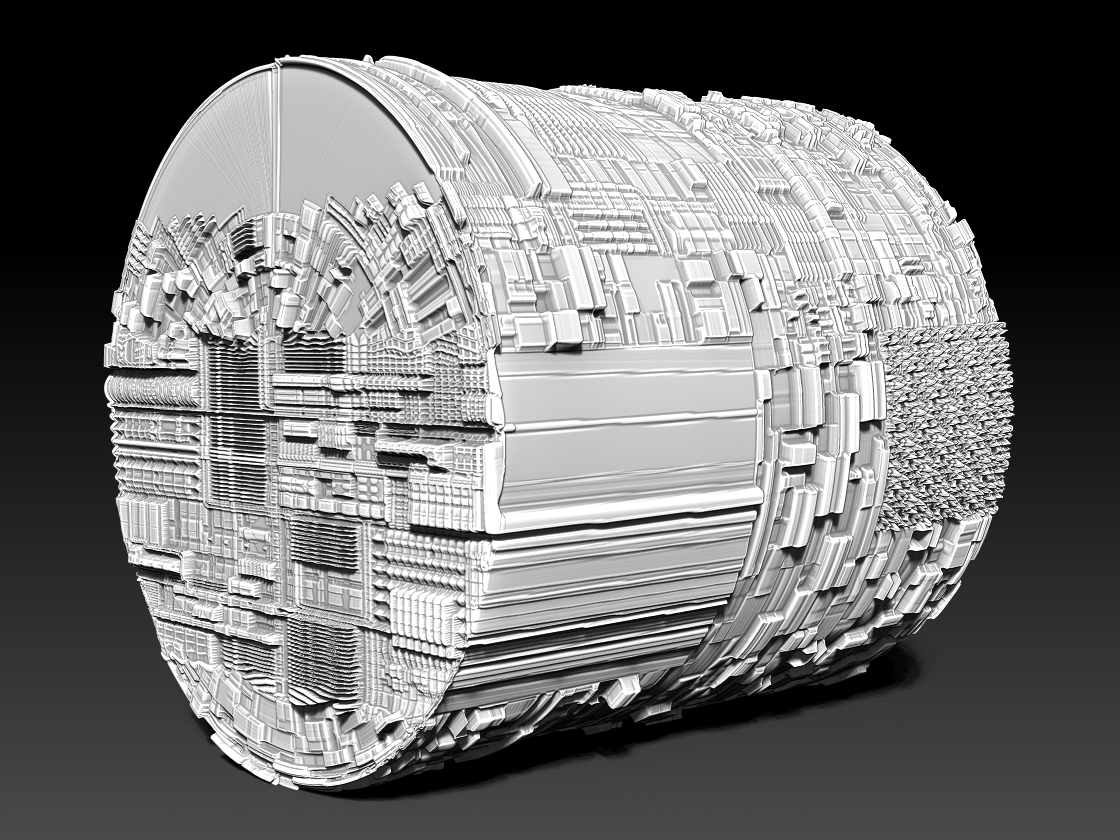
Anyhow here is what Im have been doing, its got all of the different UV map types that ZBrush has except the Fibermesh one (Im going to mess with that soon!).
I did this with no effort, just selected areas and assigned each of the different types then applies a couple of different displacement maps.

Its sort of a simple example but it makes what I did very visible:

|

RoundSquare-sm.jpg