ZBrushCentral

Are There Any Dynamesh Tutorials Available Yet?

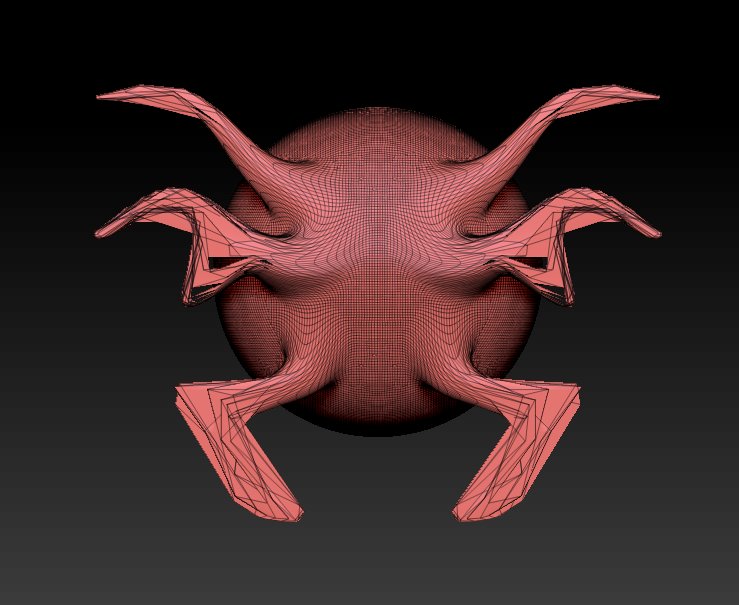
Hi, Sorry for my ignorance on this. I loaded a sphere, selected 'Make Polymesh 3D" and then pressed the “Dynamesh” button but I still get really bad deformations when using the “Snakehook” brush.

Can someone please tell me what I am doing wrong or better yet, are there are any tutorials yet on using Dynamesh? I can’t seem to find them in the ZClassroom Portal. Thanks.

Attachments

dynamesh.jpg

There are no official tutorial vids up yet as far as I know, but the documentation on the tools is pretty good, and Ryan posted a couple of good dynamesh vids the other day:

http://www.zbrushcentral.com/showthread.php?161219-Z4R2-Dynamesh-Beyond-the-Polygon-Barrier

Also, check through the R2 beta forum. Many of the beta users have posted some sort of video or pictorial examples of their process.

Thanks Spyndel. Have you been able to figure it out? I just need a few pointers to get me going. :slight_smile:

  1. ManualupDate
    Keep in mind that the DynaMesh creation is not an automatic process. You will needto update your geometry when you feel that you need it. To perform this step, you mustbe in Edit >> Draw Mode and simply hold the CTRL key while click/dragging on an emptyspace of the document in the same way that you would to a clear a mask on your model.Upon receiving this command, DynaMesh will update your geometry in a fraction of second.

Without wanting to sound like a jerk, I do suggest you avail yourself of the documentation:

http://www.pixologic.com/docs/index.php/Dynamesh

Ryan’s vids are a good introduction to the concepts involved.

The one tip I will give you, is that dynameshing is a manual process. You ctrl drag on empty canvas to remesh whats in front of you. This will activate the masking marquee, but it also activates the remeshing. If you ctrl drag directly over your mesh, you will mask it.

I’ve noticed that sometimes I have to Ctrl-drag on the canvas a couple of times to get DynaMesh to update. Try that and see if it then works for you.

It works without fail for me (assuming theres something to update…it wont update if vertices have not changed position)

However, if part of your active mesh is masked, the first ctrl-drag on empty canvas will remove your mask, as usual. Remeshing will not happen while part of your mesh is masked or hidden. Ctrl-dragging on empty canvas after the mask is removed, will re-mesh.

I didn’t see the Dynamesh page until now and it’s been very helpful… Thanks.

DynaMesh Resolution and Details
On a technical level, the new geometry resolution generated by DynaMesh is limited to a cube of 1024x1024 (≈1.05M polys per face & ≈6.3M polygons per DynaMesh/Subtool). When the mesh bounding box is pushed out of this maximum resolution, the geometry can start lose details.
When you start with a low resolution, a larger model will be allowed before it starts losing details. A higher resolution will allow more small details, but it will be limited in terms of how much you can expand the bounding box size – in other words, how far you can push the surface between remesh operations.

A few questions comes to mind after reading this.

On a technical level, the new geometry resolution generated by DynaMesh is limited to a cube of 1024x1024 (≈1.05M polys per face & ≈6.3M polygons per DynaMesh/Subtool). When the mesh bounding box is pushed out of this maximum resolution, the geometry can start lose details.
When you start with a low resolution, a larger model will be allowed before it starts losing details. A higher resolution will allow more small details, but it will be limited in terms of how much you can expand the bounding box size – in other words, how far you can push the surface between remesh operations.

  1. So according to this there is a “limit” as to how far you can expand your mesh (using the snakehook tool for example you might not be able to pull out any more geometry at a certain point) It says you will not be able to pull out any more geometry past 1024 x 1024 but how can I prevent this or build a base mesh that will stay within these limits?

  2. What size should I create my base mesh. For example would using a cube with 24 poly’s be a good base mesh?
    cube.jpg

  3. Would it be best then to start out with a low resolution and then increase the resolution as you finalize the form?

“Due to an extremely high volume demand, these pages are currently unavailable at this time.”

Well, so much for that idea…

The same documentation comes with your copy of Zbrush r2, as you were told in your download email. You do not need the online docs. I simply couldn’t provide a link to the copy of the documentation on his own hard drive:

By default, your ZBrush 4R2 installation includes a Documentation folder. Within this folder you will find PDF’s covering the new features in ZBrush 4R2 as well as everything that was introduced in version 4.

@Paint Guy

I don’t know the answer to those questions, but I promise you you’re over thinking it. Those remarks, to me, are just reminders that dynamesh is a tool ideally suited for the manipulation of form in low to medium resolution meshes, not high resolution detail. It’s for quickly blocking out form, not carving wrinkles and pores into someones skin.

The whole point of dynamesh is to not have to think about stuff like that. Just get yourself a sphere, taffy pull it and play around with it, remesh it every which way. You’ll get more of an education doing that than anyone will give you here and find your limits. Youll be able to transfer more detail with crisper forms, the higher you set your dynamesh resolution, just understand there is a practical limit to how detailed a mesh you can use with dynamesh. Beyond that , you need to rely on Zbrushes conventional methods for transferring detail (freeze higher subdivision levels and use projection).
Well thanks, although I know that.
I just hadn’t bothered to download or install it yet. I was trying to ascertain if I should even bother just yet, because, remembering back on it, the first update for the version 3 cycle didn’t exactly blow me away and instead, cost me a lot of time.

But I didn’t mean it sarcastically towards you, just pointing it out in general. Anyone who was hoping to do as I was, would be SOL if they wanted to read the docs online.
And it’s still down now too.

I could not write this any better, thanks:)

No need to worry, you may install Z4R2 without having to uninstall Z4.
If - for whatever reason - you do not like Z4R2, Z4 will be ready for you to use:)

Good Point. Thanks. :slight_smile: