ZBrushCentral

Appended/inserted tools between 2 diferent tools in the same size are scaled.

Hello, i am having a problem that didnt happened before between this 2 documents.

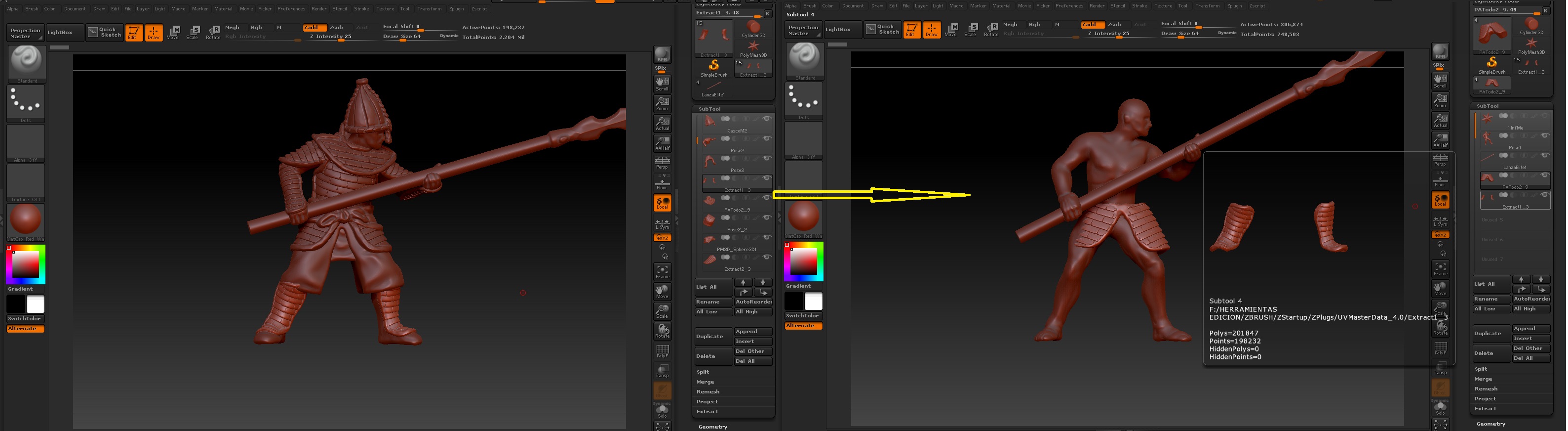
i have 2 files, that are originated from the same document, i want to append the legs armour into the other tool, but it appears in a molecular size , and if i do it backwards, it is BIG.

That did not happened 2 days ago, when for example i appended the upper leg protection + spear, they were appended without this automatic and annoying scaling.

IN the image you can see the document “A”, and the document “B” in which i appended the legs armor and it cant even be seen…

So, how can i make it work?

Thanks.

Attachments
scaleproblem.jpg

check the size of your objects inside of tool.preview and also your settings inside of tool.geometry.size (That might be in subtools.size). Also check your tool.export sizes.

Thanks, i tried and “worked”, first, i didnt knew that, the size (well, i am new to zbrush we can say ) however what called my attetion was that: after appending the tool, i changted the size in geometry/size, but hten pressed control + Z… and magically, it autosized to its correct size, tried that with other 2 subtolls, and the same happened…

I have the solution for the problem (thanks to you) but… i dont understand why this problem happen? :slight_smile:

PS: now i tried changing the size with deformation/size, and tried the same… changed the size randomly, and then pressed control + Z, and the objetc becomes original size…

i noted that, when i press control + Z, it appears from nothing a “undo history” in the affected subtool, its like a “ghost size change” what is happening :0