ZBrushCentral

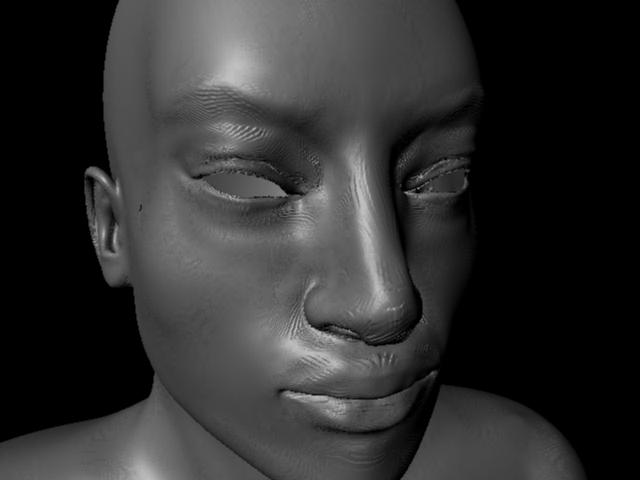
anyone recognize these maya displacent artifacts?

Hi all,
Getting some very odd displacement artifacts using quickcode: DE-LBEK-EAEAEA-D32

which is what i normally use.
in maya 2008 sp1 + extension 2

plus using ccmesh script…

displacement creates these artifacts using subdiv approximation set to spatial at 6 max, fine, etc.

color balance set to 2.2 , -1.1 etc.

my mesh is not too big… inside the grid , maybe the length of it in height…

here is a pic of the artifacts…

[stupid-artifacts.jpg]head.jpg
thanks in advance guys!

for the record,
These were a result of likely one of these 3 things:

  1. Non-manifold geometry in the form of a rogue vert on the mesh in maya. This vert appeared perfectly OK, cleanup did not find it, but the render output complained. Zbrush appears to have corrupted this mesh somewhere along the normal sculpting process. not sure why. i found an earlier sub-d 1st level cage and used that for my maya scene.

  2. Spatial Subdivision Approximation caused some of these artifacts for sure. I used Parametric and it got rid of most problems.

  3. Neither Zbrush nor maya seemed to find this in my uv layout but there may have been some uvs outside of the 0,1 space layout and some very small overlaps.

Good luck to all!

Are you rendering with Maya Software?. If you trying it, well, use Maya hardware or Mental ray.