ZBrushCentral

Answered: ZBrush Suggestion- Please- give me a measuring tape.

I have posted threads about this before, but my need for a measuring tape within this program is growing and so important that I wrote an entire post on it. Please Pixologic, it can’t be that hard to do. Please give us a measuring tape. Here is the blog post- “I really need a measuring tape in ZBrush or Mudbox”

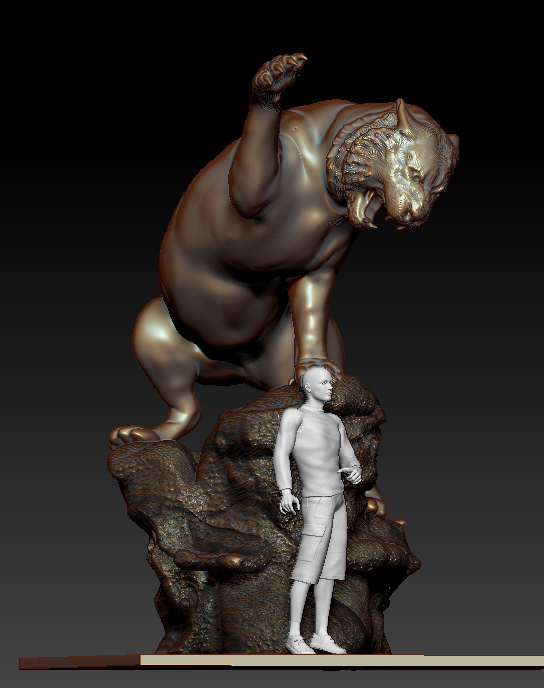
I won’t rehash the entire blog post but as a sculptor who uses ZBrush to create images that work in the real world, it is a tool that I really, really need. No, there is no weight to a piece in the computer but this piece does have hundreds and hundreds of lbs when it is in the real world. That is before it even goes to bronze. Just trying to work out how to make the base that will hold up the clay is causing me to stop, write this post and beg, PIXOLOGIC PLEASE! it can’t be that hard, please give us a measuring tape in ZBrush.

Attachments
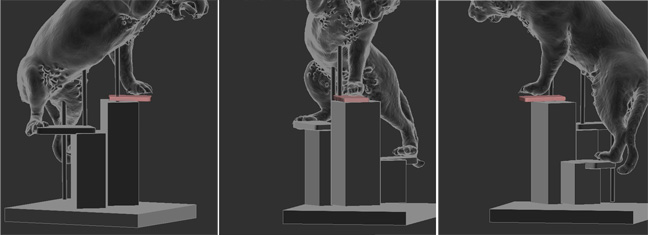
tigerarmature.jpg

Snapz Pro XScreenSnapz185.jpg

I second that units could be shown in feet and inches, with ability to move the objects axis easily.

You have it! The TransPose line can be defined to be any unit of measurement you wish. Calibrate it by drawing the line to the desired length and setting the Calibration Distance value. From then on, whenever you draw a TransPose line the Status bar will display the length of the line.

These settings are accomplished in Preferences >> TransPose Units and you can read more about the feature in the PDF’s found in your Documentation folder.

If I’m right, that units have name but it can be any name you can write, I can measure a distance in milimeters or in carrots…, and the spacing between the lines doesn’t change, so it’s not the best solution.

Or if you have a step-by-step for your solution, please explain for idiots :smiley:

You guys rock. Thanks also to pixologic for hearing my request for all of these years. I Do find that I actually still have to count the units as I’m working. MIssing a foot on the above sculpture or even a 1/2 a foot would be tragic. Do you all know if the measurements actually show up anywhere? IT would be great to use the transpose line and then look and see if what I have drawn is actually the amount of feet I need? In the case of the tiger I have decided to sculpt him in two parts and need to be sure those two parts will fit in the 9 foot clearing of the studio. I’m working through this, but as a futher request it would be great if these measurements showed up and as I use the transpose tool I could check myself. IE… Ah yes, that is 15’ 3" and the width then is… Posting about this now on the blog.

The post about how I used it. http://creativesculpture.com/blog/2013/02/measuring-tape-in-zbrush.html

Top left corner. More information gets displayed as you’re actively drawing the transpose line, but the units will remain in the same location even afterwards