I’m working on a project for a 3D Print
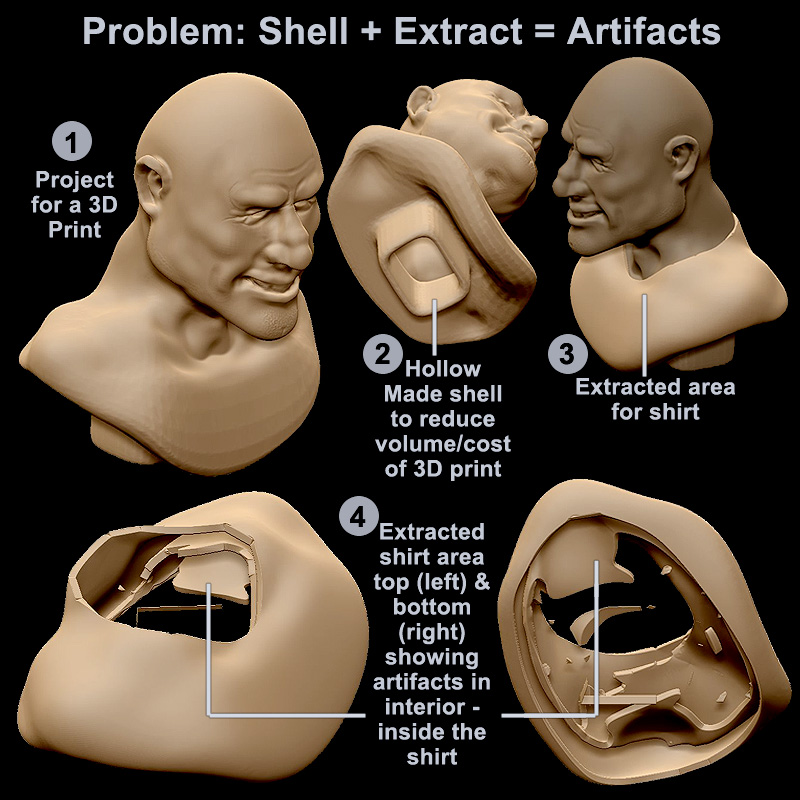
As the image shows, I first made my sculpt hollow (to reduce the volume and cost of the print)
Then I masked an area for a shirt, then extracted that
There are pieces (artifacts) inside the shirt area
No doubt caused when I extracted from the hollowed shell
- Is there a way to extract only the outer surface?
- What would I do to avoid this?
Thanks
Attachments
 Thanks. The back-face masking eliminated most of it… tried all sort of settings - will look up more info about it